 Lapsed, fee not paid12 drawings
Software & Apps · US 9,870,071 B2
Method and apparatus for user authentication
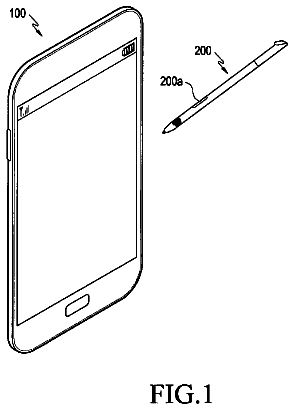
An apparatus and a method for managing security of a terminal which increases reliability of an electronic signature.
US 9,870,083 B2 · Assignee: Microsoft Technology Licensing, LLC · Inventors: Hinckley; Ken et al.
Sheet 1 of 14 from the published document. All sheets in the USPTO PDF
A grip of a primary user on a touch-sensitive computing device and a grip of a secondary user on the touch-sensitive computing device are sensed and correlated to determine whether the primary user is sharing or handing off the computing device to the secondary user. In the case of handoff, capabilities of the computing device may be restricted, while in a sharing mode only certain content on the computing device is shared. In some implementations both a touch-sensitive pen and the touch-sensitive computing device are passed from a primary user to a secondary user. Sensor inputs representing the grips of the users on both the pen and the touch-sensitive computing device are correlated to determine the context of the grips and to initiate a context-appropriate command in an application executing on the touch-sensitive pen or the touch-sensitive computing device. Meta data is also derived from the correlated sensor inputs.
Many mobile computing devices (e.g., tablets, phones, etc.), as well as other devices such as desktop digitizers, drafting boards, tabletops, e-readers, electronic whiteboards and other large displays, use a pen, pointer, or pen type input device in combination with a digitizer component of the computing device for input purposes. Many of these computing devices have touch-sensitive screens and interact with pen and with bare-handed touch or with the two in combination.
1 of 14 drawing sheets so far from the published document, cropped to the drawing. Every sheet is in the USPTO PDF.
What the patent claimed, word for word. All of it is now free to use.
Many mobile computing devices (e.g., tablets, phones, etc.), as well as other devices such as desktop digitizers, drafting boards, tabletops, e-readers, electronic whiteboards and other large displays, use a pen, pointer, or pen type input device in combination with a digitizer component of the computing device for input purposes. Many of these computing devices have touch-sensitive screens and interact with pen and with bare-handed touch or with the two in combination.
This Summary is provided to introduce a selection of concepts in a simplified form that are further described below in the Detailed Description. This Summary is not intended to identify key features or essential features of the claimed subject matter, nor is it intended to be used as an aid in determining the scope of the claimed subject matter.
In general, implementations of a pen and computing device sensor correlation technique as described herein correlate sensor signals received from various grips on a touch-sensitive pen (e.g., also called a pen, sensor pen or touch-sensitive stylus herein) and touches to, or grips on, a touch-sensitive computing device (for example, a touch-sensitive tablet computing device) in order to determine the context of such grips and touches and to issue context-appropriate commands to the touch-sensitive pen and/or the touch-sensitive computing device. The touch or grip-sensitive regions or the device(s) may or may not be associated with an underlying display (and, indeed, may include touch-sensitivity on portions of a device with a display in combination with touch or grip sensitive on other parts of the device without a display). It should be noted that the touch-sensitive computing device can be associated with a display or not, or the two can be used in combination.
Some implementations of the pen and computing device sensor correlation technique can be used in a multiple user/multiple device mode. For example, in some implementations sensor inputs based on a grip of a primary user on a touch-sensitive computing device and a grip of a secondary user on the touch-sensitive computing device are sensed and correlated. The sensor inputs for the grips of the primary and secondary users are evaluated to determine the context of these grips and to initiate a command, or recognition of a context which can influence various system settings or parameters to a command, in an application executing on the touch-sensitive computing device. The correlated grips can be evaluated to determine that the grips represent a handoff of the computing device from the primary user to the secondary user. In this case one or more capabilities of the touch-sensitive computing device may be restricted following the handoff. Alternately, the grip of the secondary user can be determined to be concurrent with the grip of the primary user. In this case, a sharing mode can be entered on the computing device. For example, the secondary user may only be allowed to view and markup only content that is currently displayed on a display of the computing device.
In some implementations of the pen and sensor correlation technique both the pen and the touch-sensitive computing device are passed from a primary user to a secondary user. To this end, at about the same time, the sensor inputs for a grip of a primary user on the touch-sensitive computing device and on the touch-sensitive pen are received. Concurrently, the sensor inputs for a grip of the secondary user on the touch-sensitive computing device and the touch-sensitive pen are received. The sensor inputs from the grips of the primary and secondary users on the pen and the touch-sensitive computing device, as well as possibly other data, are correlated to determine the context of the grips and to initiate a context-appropriate command in an application executing on the touch-sensitive pen or on the touch-sensitive computing device.
Furthermore, some implementations of the pen and computing device sensor correlation technique can be used to find meta information to semantically label the context of the sensed grips or touches. For example, some pen and computing device sensor correlation technique implementations correlate the received signals of the contacts by one or more users on two or more touch-sensitive devices and determine the context of the contacts based on the correlation of the signals. The determined context of the contacts is labeled as metadata for use in an application. For example, this context can be which hand the user is holding a device in, how the user is holding the device, how many users are sharing a device, and so forth. The derived metadata can be used to label any type of input and can be used for other purposes. The context metadata also can be used to initiate a context-appropriate user interface action.
Many, many other capabilities that exploit the natural ways a user or users hold and touch a touch-sensitive pen and/or a touch-sensitive computing device in order to provide the user with context-specific tools are possible.
The specific features, aspects, and advantages of the claimed subject matter will become better understood with regard to the following description, appended claims, and accompanying drawings where:
FIG. 1 depicts exemplary naturally-occurring core pen grips and poses.
FIG. 2 depicts exemplary naturally-occurring single finger extension grips for touch screen manipulation.
FIG. 3 depicts exemplary naturally-occurring multiple finger extension grips for touch screen manipulation.
FIG. 4 depicts other types of naturally-occurring pen grips.
FIG. 5 provides an exemplary system that illustrates program modules for implementing various implementations of the pen and computing device sensor correlation technique, as described herein.
FIG. 6 provides an exemplary flow diagram of using the pen and computing device sensor correlation technique to provide a correlated touch and sensor pen input mechanism, as described herein.
FIG. 7 provides an exemplary flow diagram of using the pen and computing device sensor correlation technique to provide metadata based on correlated signals received due to contacts on two or more touch-sensitive devices.
FIG. 8 provides an exemplary flow diagram of using a pointing device to continue control of an input on a display screen of a touch-sensitive computing device.
FIG. 9 provides an exemplary flow diagram of passing a touch-sensitive computing device from a primary user to a secondary user.
FIG. 10 provides an exemplary flow diagram of passing both a touch-sensitive computing device and a touch-sensitive pen from a primary user to a secondary user.
FIG. 11 provides an exemplary illustration of using the pen and computing device sensor correlation technique to provide a magnifier/loupe tool input mechanism based on the pen being held in a user's preferred hand in a tucked grip, as described herein.
FIG. 12 provides an exemplary illustration of using the pen and computing device sensor correlation technique to provide a full-canvas pan/zoom input mechanism based on the actions of a user's non-preferred hand, as described herein.
FIG. 13 provides an exemplary illustration of using the pen and computing device sensor correlation technique to provide a drafting tool input mechanism based on the touch and grip patterns of both the user's preferred hand and the user's non-preferred hand, as described herein.
FIG. 14 provides an exemplary illustration of using the pen and computing device sensor correlation technique to provide a pen tool input mechanism based on the touch and grip patterns of both the user's preferred hand and the user's non-preferred hand, as described herein.
FIG. 15 provides an exemplary illustration of using the pen and computing device sensor correlation technique to provide a canvas tool input mechanism based on the touch and grip patterns of both the user's preferred hand and the user's non-preferred hand, as described herein.
FIG. 16 provides an exemplary illustration of two users passing a touch-sensitive pen between them and initiating context-appropriate capabilities based on the grip patterns of both users on the touch-sensitive pen and the orientation of the pen, as described herein.
FIG. 17 provides an exemplary illustration of two users passing or sharing a touch-sensitive computing device between them based on the grip patterns of the two users on the touch-sensitive computing device and the orientation of the touch-sensitive computing device, as described herein.
FIG. 18 is a general system diagram depicting a simplified general-purpose computing device having simplified computing and I/O capabilities, in combination with a touch-sensitive pen having various sensors, power and communications capabilities, for use in implementing various implementations of the pen and computing device sensor correlation technique, as described herein.
In the following description of the implementations of the claimed subject matter, reference is made to the accompanying drawings, which form a part hereof, and in which is shown by way of illustration specific implementations in which the claimed subject matter may be practiced. It should be understood that other implementations may be utilized and structural changes may be made without departing from the scope of the presently claimed subject matter.
1.0 Introduction
The following paragraphs provide an introduction to mobile sensing, sensor-augmented pens, grip sensing, and pen+touch input on touch-sensitive computing devices.
1.1 Mobile Sensing on Handheld Computing Devices
Tilt, pressure, and proximity sensing on mobile devices enables contextual adaptations such as detecting handedness, portrait/landscape detection, or walking versus stationary usage. Grip sensing allows a mobile device to detect how the user holds it, or to use grasp to automatically engage functions such as placing a call, taking a picture, or watching a video. Implementations of the pen and computing device sensor correlation technique described herein adopt the perspective of sensing natural user behavior, and applying it to single or multiple touch-sensitive pen and touch-sensitive computing device (e.g., tablet) interactions.
Multi-touch input and inertial sensors (Inertial Measurement Units (IMU's) with 3-axis gyroscopes, accelerometers, and magnetometers) afford new possibilities for mobile devices to discern user intent based on grasp and motion dynamics. Furthermore, other sensors may track the position of these mobile devices. Implementations of the pen and computing device sensor correlation technique illustrate new techniques that leverage these types of motion sensing, grip sensing, and multi-touch inputs when they are distributed across separate pen and touch-sensitive computing (e.g., tablet) devices.
1.2 Grips and Sensing for Tablets
Lightweight computing devices such as tablets afford many new grips, movements, and sensing techniques. Implementations of the pen and computing device sensor correlation technique described herein are the first to implement full grip sensing and motion sensing—on both tablet and pen at the same time—for sensing pen+touch interactions. Note that “grip” may be recognized by the system as a holistic combination of a particular hand-contact pattern that takes into account the 3D orientation or movement of the implement or device as well; that is, no clear line can be drawn between touch-sensitive grip-sensing and inertial motion-sensing, per se, since all these degrees of freedom may be employed by a recognition procedure to classify the currently observed “grip” as accurately as possible. Thus, whenever the term “grip” is used the possible combination of touch with motion or orientation degrees-of-freedom is implied.
1.3 Palm Detection and Unintentional Touch Handling
Palm contact can cause significant false-activation problems during pen+touch interaction. For example, some note-taking applications include palm-blocking but appear to rely on application-specific assumptions about how and where the user will write. Some palm-rejection techniques require the user to bring the pen tip on or near the screen before setting the palm down, which requires users to modify their natural movements. Implementations of the pen and computing device sensor correlation technique use sensors to detect when a touch screen contact is associated with the hand holding the pen.
1.4 Sensor-Augmented and Multi-DOF Pen Input
Auxiliary tilt, roll, and other pen degrees-of-freedom can be combined to call up menus or trigger mode switches without necessarily disrupting natural use. Implementations of the pen and computing device sensor correlation technique implement capabilities where the user can extend one or more fingers while tucking the pen. The pen and computing device sensor correlation technique implementations can sense these contacts as distinct contexts with separate functions, even if the user holds the pen well away from the screen.
Pens can be augmented with motion, grip, and near-surface range sensing. One type of pen uses grip sensing to detect a tripod writing grip, or to invoke different types of brushes. Other systems use an integrated IMU on the pen as a feature to assist grip recognition and sense the orientation of associated computing device/tablet (e.g. for horizontal vs. drafting table use) to help provide appropriate sketching aids. The pen and computing device sensor correlation technique implementations described herein go beyond these efforts by exploring sensed pen grips and motion in combination with pen+touch gestures, and also by extending grip sensing to the tablet itself.
2.0 Natural Pen and Tablet User Behaviors
Implementations of the pen and computing device sensor correlation technique described herein use natural pen and touch-sensitive computing device (e.g., tablet) user behaviors to determine the context associated with these behaviors in order to provide users with context-appropriate tools. As such, some common grips that arise during digital pen-and-tablet tasks, and particularly touch screen interactions articulated while the pen is in hand are useful to review and are enumerated below and shown in FIGS. 1, 2, 3 and 4 . A wide variety of behaviors (listed as B 1 -B 11 below) have been observed and were used in designing various implementations of the pen and computing device sensor correlation technique. The following paragraphs focus on behaviors of right-handers; left-handers are known to exhibit a variety of additional grips and accommodations. It should be noted that the behaviors discussed below and shown in FIGS. 1, 2, 3 and 4 are only exemplary in nature and other behaviors are entirely possible.
2.1 Behavior B 1 . Stowing the Pen while Using Touch.
The tendency of users to stow the pen when performing touch gestures on a touch screen of a touch-sensitive computing device such as the tablet is obvious. Users typically only put the pen down when they anticipate they will not need it again for a prolonged time, or if they encounter a task that they feel is too difficult or awkward to perform with pen-in-hand, such as typing a lot of text using the on-screen keyboard.
2.2 Behavior B 2 . Tuck Vs. Palm for Stowing the Pen.
There are two distinct grips that users employ to stow the pen. These are a Tuck grip (pen laced between fingers) shown in FIG. 1 104 and a Palm grip (with fingers wrapped lightly around the pen barrel) shown in FIG. 1 106 . Users stow the pen during pauses or to afford touch interactions.
2.3 Behavior B 3 . Preferred Pen Stowing Grip Depends on Task Context.
For users that employ both Tuck grips 104 and Palm grips 106 , a Tuck grip affords quick, transient touch interactions, while a Palm grip is primarily used if the user anticipates a longer sequence of touch interactions. Other users only use Tuck grips 104 to stow the pen.
2.4 Behavior B 4 Grip vs. Pose.
For each grip—that is, each way of holding the pen—a range of poses where the pen orientation is changed occur, often by wrist supination (i.e. turning the palm upward). Human grasping motions with a pen therefore encompass the pattern of hand contact on the barrel, as well as the 3D orientation of the pen. As shown in FIG. 1 , full palmar supination 112 is observed for the Tuck grip 104 and Palm grip 106 , but only half-supination 110 for the Writing grip.
2.5 Behavior B 5 . Extension Grips for Touch.
As shown in FIGS. 2 and 3 , many Extension Grips exist where users extend one or more fingers while holding the pen to make contact with a touch screen. These were classified broadly as single-finger extension grips ( FIG. 2, 200 ) vs. multiple-finger extension grips ( FIG. 3, 300 ), which users can articulate from either the Tuck or the Palm grip. (Note that, while not illustrated, three-finger extension grips are also possible from some grips).
2.6 Behavior B 6 . Variation in Pen Grips.
Users exhibit many variations in a tripod grip for writing which leads to variations in users' resulting Tuck, Palm, and Extension grips. For example, one user's style of tucking led her to favor her ring finger for single-touch gestures (see Tuck-Ring Finger Extension Grip ( FIG. 2, 206 )).
2.7 Behavior B 7 . Consistency in Grips.
Each user tends to consistently apply the same pen grips in the same situations. Users also tend to maintain whatever grip requires the least effort, until a perceived barrier in the interaction (such as fatigue or inefficiency) gives them an incentive to shift grips. Users switch grips on a mobile computing device (e.g., tablet) more often when sitting than standing, perhaps because there are few effective ways to hold or re-grip such a device while standing.
2.8 Behavior B 8 . Touch Screen Avoidance Behaviors.
Users often adopt pen grips and hand postures, such as floating the palm above a touch screen while writing, or splaying out their fingers in a crab-like posture, to avoid incidental contact with the screen. Another form of touch screen avoidance is perching the thumb along the outside rim of touch-sensitive computing device (e.g., the tablet bezel), rather than letting it stray too close to the touch screen when picking up the touch-sensitive computing device. These unnatural and potentially fatiguing accommodations reflect a system's inability to distinguish the context of intentional versus unintentional touch.
2.9 Behavior B 9 . Finger Lift for Activating Pen Controls.
It was observed that users only activate a pen barrel button from the Writing grip ( FIG. 1, 102, 108, 110 ), and then only with the index finger. Users hold the pen still when tapping the button. The thumb is also potentially available for controls from the Palm-like Thumb Slide grip ( FIG. 4, 404 ).
2.10 Behavior B 10 . External Precision Grip.
Users employ an External Precision grip ( FIG. 4, 402 ), with the pen held toward the fingertips and perpendicular to the writing surface, for precise pointing at a small target. This provides the possibility to provide contextual enhancements, such as automatically zooming the region of the tablet screen under the pen tip, when this grip is detected.
2.11 Behavior B 11 . Passing Grip.
Passing prehension is observed when participants pass the pen and touch-sensitive computing device (e.g., tablet) to another person. Users tend to hold the device securely, in more of a power grip, and extend it from their body while keeping it level, so that their intent is clear and so that the other person can grab it from the far side.
Having described these natural behaviors, the following sections describe how the recognition of all of these grips, touches and motions are used to leverage these behaviors in order to provide context-appropriate tools for carrying out a user's intended actions.
3.0 Introduction to the Pen and Computing Device Sensor Correlation Technique:
The pen and computing device sensor correlation technique implementations described herein contribute cross-device synchronous gestures and cross-channel inputs for a touch-sensitive computing device/pen (e.g., tablet-stylus) distributed sensing system to sense the naturally occurring user behaviors and unique contexts that arise for pen+touch interaction. Note, however, that while much of the discussion here focuses on pen/tablet interactions, other pen-like mechanical intermediaries or small wearable devices can enable context-sensing while interacting with tablets using variations of the pen and computing device sensor correlation technique. A small motion-sensing ring worn on the index finger, for example, could sense when the user taps the screen with that finger versus. another digit. Watches, sensors worn on the fingertip or fingernail, bracelets, arm-bands, bandages or wraps, elbow pads, braces, wrist-bands, gloves augmented with sensors, subcutaneous implants, or even e-textile shirt sleeves with embedded sensors, represent other similar examples that would enable and suggest related techniques to individuals skilled in the art. Likewise, other manual tools such as a ruler, compass, scalpel, tweezer, stamp, magnifying glass, lens, keypad, calculator, french curve, shape template, paint-brush, or airbrush could serve as pen-like implements, whether held in the preferred or non-preferred hand, that also enable related techniques.
Implementations of the pen and computing device sensor correlation technique described herein employ grip and touch sensing to afford new techniques that leverage how users naturally manipulate these devices. Implementations of the pen and computing device sensor correlation technique can detect whether the user holds the pen in a writing grip or palmed and/or tucked between his fingers in a stowed mode. Furthermore, pen and computing device sensor correlation technique implementations can distinguish bare-handed inputs, such as drag and pinch gestures produced by a user's non-preferred hand, from touch gestures produced by the hand holding the touch-sensitive pen which necessarily imparts a detectable motion signal to the pen. Implementations of the pen and computing device sensor correlation technique can sense which hand grips the touch-sensitive computing device (e.g., tablet), and determine the screen's relative orientation to the pen and use the screen's orientation and touch patterns to prevent accidental screen content rotation. By selectively combining sensor signals from the touch-sensitive pen and the touch-sensitive computing device and using them to complement one another, implementations of the pen and computing device sensor correlation technique can tailor user interaction with them to the context of use, such as, for example, by ignoring unintentional touch inputs while writing, or supporting contextually-appropriate tools such as a magnifier for detailed stroke work that appears when the user pinches with the touch-sensitive pen tucked between his fingers.
Implementations of the pen and computing device sensor correlation technique, as described herein, use a touch-sensitive pen enhanced with a power supply (e.g., battery) and multiple sensors (e.g., a sensor pen) to enable a variety of input techniques and commands based on the correlated grip patterns of a user holding the touch-sensitive pen and touch contacts and grips on the touch-sensitive computing device (e.g., a touch-sensitive tablet computer) and associated motions and orientations of these devices. For example, pressure sensors can be used to detect the user's grip patterns on the sensor pen and touch and grip patterns on the touch-sensitive computing device. Implementations of the pen and computing device sensor correlation technique correlate sensor pen grips and touch-sensitive computing device touches and grips to determine the intentions of the user and the context in which the user wishes to use the touch-sensitive pen or the touch-sensitive computing device. This is based on naturally occurring user behaviors such as, for example, whether a user is gripping either device with their preferred hand or their non-preferred hand. The determined user intentions and context of use are then used to generate context-appropriate commands and capabilities for the touch-sensitive computing device and/or the touch-sensitive pen.
The term pressure as described herein, as relating to pressure sensors and the like, may refer to various sensor types and configurations. For example, in various cases and implementations, pressure may refer to pen tip pressure exerted on a display. In general, pen tip pressure is typically sensed by some type of pressure transducer inside the pen, but it is also possible to have the pen tip pressure sensing done by the display/digitizer itself in some devices. In addition, the term pressure or pressure sensing or the like may also refer to a separate channel of sensing the grip pressure of the hand (or fingers) contacting an exterior casing or surface of the touch-sensitive pen or touch-sensitive computing device. Various sensing modalities employed by the pen and computing device sensor correlation technique may employ both types of pressure sensing (i.e., pen tip pressure and grip pressure) for initiating various capabilities and commands.
Various devices used to enable some of the many implementations of the pen and computing device sensor correlation technique described herein include pens, pointers, pen type input devices, etc., that are often referred to herein as a sensor pen or touch-sensitive pen for purposes of discussion. Further, the sensor pens or touch-sensitive pens described herein can be adapted to incorporate a power supply and various combinations of sensors. For example, there are various possibilities of incorporating power into the pen, such as by inductive coupling, a super capacitor incorporated into the pen that recharges quickly when the pen comes in range or is docked to or placed on/near a computing device, a battery incorporated in the pen, obtaining power via pen tether, or acquiring parasitic power via motions of the pen. The power supply may feature automatic low-power modes when the pen is not moving or not being held. The sensors may inform this decision as well. Various combinations of sensors can include, but are not limited to, inertial sensors, accelerometers, pressure sensors, grip sensors, near-field communication sensors, RFID tags and/or sensors, temperature sensors, microphones, magnetometers, capacitive sensors, gyroscopes, sensors that can track the position of a device, finger print sensors, galvanic skin response sensors, etc., in combination with various wireless communications capabilities for interfacing with various computing devices. Note that any or all of these sensors may be multi-axis or multi-position sensors (e.g., 3-axis accelerometers, gyroscopes, and magnetometers). In addition, in various implementations, the touch-sensitive pens described herein have been further adapted to incorporate memory and/or computing capabilities that allow them to act in combination or cooperation with other computing devices, other touch-sensitive pens, or even as a standalone computing device.
Implementations of the pen and computing device sensor correlation technique are adaptable for use with any touch-sensitive computing device having one or more touch-sensitive surfaces or regions (e.g., touch screen, touch sensitive bezel or case, sensors for detection of hover-type inputs, optical touch sensors, etc.). Note that touch-sensitive computing devices include both single- and multi-touch devices. Examples of touch-sensitive computing devices can include, but are not limited to, touch-sensitive display devices connected to a computing device, touch-sensitive phone devices, touch-sensitive media players, touch-sensitive e-readers, notebooks, netbooks, booklets (dual-screen), tablet type computers, or any other device having one or more touch-sensitive surfaces or input modalities. The touch-sensitive region of such computing devices need not be associated with a display, and the location or type of contact-sensitive region (e.g. front of a device on the display, versus back of device without any associated display) may be considered as an input parameter for initiating one or more motion gestures (i.e., user interface actions corresponding to the motion gesture).
The term “touch” as used throughout this document will generally refer to physical user contact (e.g., finger, palm, hand, etc.) on touch sensitive displays or other touch sensitive surfaces of a computing device using capacitive sensors or the like. However, some touch technologies incorporate some degree of non-contact sensing, such as the use of highly sensitive self-capacitance detectors to detect the geometry of the fingers, pen, and hand near the display—as well as the pen-tip hover sensing. Arrays of IR sensor-emitter pairs or sensor-in-pixel display elements can also be deployed on pens, tablets, and keyboards for this purpose. Hence touch and grip may incorporate such non-contact signals for a holistic or unified notion of “grip” detection as well.
In addition, pen and computing device sensor correlation technique implementations can use a variety of techniques for differentiating between valid and invalid touches received by one or more touch-sensitive surfaces of the touch-sensitive computing device. Examples of valid touches and contacts include user finger touches (including gesture type touches), pen or pen touches or inputs, hover-type inputs, or any combination thereof. With respect to invalid or unintended touches, pen and computing device sensor correlation technique implementations disable or ignore one or more regions or sub-regions of touch-sensitive input surfaces that are expected to receive unintentional contacts, or intentional contacts not intended as inputs, for device or application control purposes. Examples of contacts that may not be intended as inputs include, but are not limited to, a user's palm resting on a touch screen while the user writes on that screen with a pen or holding the computing device by gripping a touch sensitive bezel, etc.
The pen and computing device sensor correlation technique implementations provide a number of advantages relating to pen-based user interaction with a touch-sensitive pen and touch-sensitive computing devices, including, but not limited to: Novel solutions that sense grip and motion to capture the full context of pen and touch-sensitive computing device (e.g. tablet) use. Using sensors to mitigate unintentional touch (from the palm, or from the thumb when picking up the device), but also to promote intentional touch by a non-preferred hand, or via extension grips to interleave pen and touch inputs. Novel contextually-appropriate tools that combine grip, motion, and touch screen contact, including, for example, distinct tools for bare-handed input, pinch input while tucking the pen, and drafting tools that the user can summon with the non-preferred hand when the pen is poised for writing.
3.0 Exemplary System:
The pen and computing device sensor correlation technique implementations operate, in part, by correlating sensor inputs from a touch-sensitive pen and a touch-sensitive computing device to trigger various actions and capabilities with respect to either the touch-sensitive pen or the touch-sensitive computing device or both.
FIG. 5 provides a diagram of an exemplary system 500 that illustrates program modules for implementing various implementations of the pen and computing device sensor correlation technique. More specifically, FIG. 5 shows a touch-sensitive pen or sensor pen 502 in communication with touch-sensitive computing device 504 via communications link 506 . As discussed in further detail herein, the sensor pen 502 can include a variety of sensors. A sensor module 508 in the sensor pen 502 monitors readings of one or more of those sensors, and provides them to a communications module 510 to be sent to the touch-sensitive computing device 504 (or possibly another computing device (not shown) that performs computations and provides inputs to the touch-sensitive computing device 504 ). It should be noted that in another implementation some (or all) computation may be done directly on the pen before sending (i.e., grip recognition with machine learning), and some data might not always be sent to the touch-sensitive computing device (i.e., if the outcome is used local to the pen). In some instances, the touch-sensitive computing device may send information to the pen instead of, or on top of, the pen sending data to the touch-sensitive computing device.
A sensor pen input module 512 receives input from one or more sensors of sensor pen 502 (e.g., inertial, accelerometers, pressure, touch, grip, near-field communication, RFID, temperature, microphones, magnetometers, capacitive sensors, gyroscopes, IR or capacitive proximity sensors, finger print sensors galvanic skin response sensors, etc.) and provides that sensor input to a grip and touch determination module 516 . Similarly a computing device touch input module 514 receives input from one or more sensors of the touch-sensitive computing device 504 (e.g., inertial, accelerometers, pressure, touch, grip, near-field communication, RFID, temperature, microphones, magnetometers, capacitive sensors, gyroscopes, IR or capacitive proximity sensors, finger print sensors, galvanic skin response sensors, etc.) and provides that sensor input to a grip and touch determination module 516 .
The grip and touch determination module 516 determines the grip of a user on the sensor pen 502 based on the contact of a user's hand on touch-sensitive surfaces of the sensor pen (and/or the orientation of the pen—yaw, pitch roll or some subset of that—and/or other information from the sensors). For example, the sensor signals from the user's grip on the pen can be compared to a database 518 of grip patterns in order to determine the grip pattern or patterns of a user gripping the pen. In one implementation a trained classifier is used to classify the sensor signals into grip patterns on the sensor pen 502 based on grip training data. Note that this grip training data may be
for a large sample of many users;
adapted or trained based only on inputs from the specific user; and
some weighted combination of the two. Also, separate databases based on salient dimensions of the input (e.g. left-handed vs. right-handed user, size or type of the device being used, current usage posture of the device, whether on a desk, held-in-hand, resting on the lap, and so forth) may trigger the use of separate databases optimized in whole or in part to each use-case. Similarly, the grip and touch determination module 516 determines the touch of the user on a display of the touch-sensitive computing device 504 based on the signals of contact of the user's fingers or hand on a display of the touch-sensitive computing device (and/or the orientation of the device and/or other information from the sensors). Additionally, the grip and touch determination module 516 can determine if the user is gripping touch-sensitive surfaces of the case of the touch-sensitive computing device. For example, the sensor signals from the user's grip on the case of the touch-sensitive computing device can be compared to a database 518 of grip patterns in order to determine the grip pattern or patterns of the user gripping the device. In one implementation, one or more touch-sensitive sensors report an image of what parts of the case are being touched. Various image processing techniques can be used to interpret the image and deduce the grip. In one implementation, a (multi-touch, capacitive) grip pattern is sensed on the case of the device (e.g., the case incorporates a matrix of capacitive sensors) and motion signals and orientation of the touch-sensitive computing device (and/or pen) are also fed into this determination. In some implementations, if the touch screen has non-contact proximity sensing capability, then sensing proximity at the screen edges of the device can serve as a good proxy for grip sensing on the case. In one implementation a trained classifier is used to classify the sensor signals into grip patterns on the case of the touch-sensitive computing device based on grip training data.
The grip and touch determination module 516 correlates the sensor inputs from the sensors of the sensor pen 502 and the touch-sensitive computing device 504 to associate how the user is gripping the pen with how the user is interacting with the screen or the case of the touch-sensitive computing device. This correlated data can be used to determine the user's preferred hand/non-preferred hand of a user touching the sensor pen and/or the touch sensitive computing device. In one implementation, the preferred hand is distinguished from the non-preferred hand due to the pen motion. A bump in the pen motion is measured when a part of the preferred hand comes in contact with the touch screen of the computing device. After the contact, it can also be continuously confirmed that the pen motion correlates to the touch screen motion in order to confirm that the hand holding the pen is being held in the user's preferred hand. In some implementations it is not necessary for the pen to register a bump when it touches the screen (e.g., if the touch to the screen is very subtle or soft) in order to determine the user's preferred hand or non-preferred hand as long as correlating motions are observed.
The determined grip and touch patterns, as well as other correlated sensor inputs, can also be input into a context determination module 520 . The context determination module 520 determines the user's intent and the context of the actions that the user is intending from the correlated grip patterns, touch patterns and other sensor data. Context examples include, but are not limited to, how many users are interacting with a pen or touch-sensitive computing device, how many devices are being interacted with, whether a user is holding the sensor pen or the computing device in the user's preferred vs. non-preferred hand, individual or relative motions of the pen or the computing device, how the touch-sensitive pen or the touch-sensitive computing device is being gripped or touched, application status, pen orientation, touch-sensitive computing device orientation, relative orientation of the sensor pen to the computing device, trajectories and/or accelerations of the touch-sensitive pen and the touch-sensitive computing device, identity of the user, and so forth. This context data can be sent to a metadata labeling module 524 which can be used to semantically label this data.
The description continues in the full USPTO document.
About 6,023 words. The USPTO PDF has it with every drawing.
Fees are due 3.5, 7.5 and 11.5 years after grant. This patent expired on January 16, 2026, so the fee marked "not paid" was the one that went unpaid.
MULTI-DEVICE MULTI-USER SENSOR CORRELATION FOR PEN AND COMPUTING DEVICE INTERACTION
Filed Jun 2014 · published Dec 2015Multi-device multi-user sensor correlation for pen and computing device interaction
Filed Jun 2014 · granted Jan 2018Earlier publications, parents and continuations. None of them can still be enforced, or this patent would not be listed.
Prior art cited by the examiner or applicant. Useful when you check your own idea for novelty.
Everything on this page comes from the documents linked above.