Cross-reference to related application
Pursuant to 35 U.S.C. §119(a), this application claims the benefit of earlier filing date and right of priority to Korean Application No. 10-2014-0085403, filed on Jul. 8, 2014, the contents of which is incorporated by reference herein in its entirety.
Background of the disclosure
1. Field of the disclosure
The present disclosure relates to a mobile terminal and a method of controlling the same, which display at least one piece of content on a screen.
2. Background of the Disclosure
A terminal is broadly categorized by mobility into a mobile terminal and a stationary terminal. The mobile terminal is further categorized by portability into a handheld terminal and a vehicle-mounted terminal.
In response to an increasing demand for diversified functions, the terminal has been realized in the form of a multimedia player with multiple functions such as shooting a photographic object as a still image or moving images, reproducing digital audio and video compression files, playing a game, receiving a broadcast or the like.
Efforts are ongoing to support and increase the functionality of mobile terminals. Such efforts include software and hardware improvements, as well as changes and improvements in the structural components.
When a user desires to receive, by using a mobile terminal, other information associated with an interesting part in a content screen which the user is looking at, the user itself recognizes the interesting part in the content screen which is displayed, extracts a keyword, and intentionally performs a separate input for searching for the keyword. Also, manipulation should be performed for the search a plurality of times, and there is a difficulty in that a content screen which is currently seen is converted into a search screen, used to search for relevant information, or a screen corresponding to a search result.
Summary of the disclosure
Therefore, an aspect of the detailed description is to provide a mobile terminal and a method of controlling the same, which enable information, associated with a part which a user interestingly looks at, to be naturally searched.
Another an aspect of the detailed description is to provide a mobile terminal and a method of controlling the same, which enable information, associated with a part which a user interestingly looks at, to be searched without converting a currently output screen.
To achieve these and other advantages and in accordance with the purpose of this specification, as embodied and broadly described herein, a mobile terminal includes: a display unit configured to display a content screen; and a control unit configured to change an output state of the content screen with respect to a point from which a first touch gesture starts, in response to that the first touch gesture is sensed in the content screen, and when the first touch gesture which is continuously sensed in the content screen corresponds to a predetermined reference, perform control to search for other content associated with at least one piece of information extracted from the content screen.
In an embodiment, the first touch gesture corresponding to the predetermined reference may be a pinch-out touch gesture which is continuously sensed in the display unit, in a state where the output state of the content screen is no longer changed in response to that the pinch-out touch gesture is sensed in the content screen.
In an embodiment, when the first touch gesture corresponds to the predetermined reference, the control unit may perform control to extract at least some of visual information which is within a certain range with respect to the point from which the first touch gesture starts.
In an embodiment, when the first touch gesture corresponds to the predetermined reference, the control unit may execute search in background while maintaining the output state of the content screen, and control the display unit so that an image object, indicating execution of the search while the search is being executed, is displayed to be overlapped on the content screen.
In an embodiment, when a second touch gesture is sensed in the display unit in a state where the image object is displayed, the control unit may stop the search, and perform control so that the image object disappears from the display unit.
In an embodiment, the control unit may display, in the display unit, a second screen which is generated by enlarging the content screen with respect to a start point of the first touch gesture in proportion to that the first touch gesture is continuously sensed in the content screen, and when the first touch gesture is continuously sensed in a state where the second screen is no longer enlarged, the control unit may execute a search function using at least one piece of information, included in the second screen, as a keyword.
In an embodiment, when a first touch gesture, corresponding to the predetermined reference, being terminated is sensed, the control unit may pop up an icon, corresponding to an execution result of the search, onto one region of the display unit.
In an embodiment, the control unit may perform control so that at least one of attribute information and number information of at least one piece of searched content is marked on the popped-up icon.
In an embodiment, when a plurality of searched content correspond to a plurality of categories, the control unit may classify the searched plurality of content by category to generate different icons, and pop up the generated different icons onto the display unit.
In an embodiment, when a touch is sensed in the popped-up icon, the control unit may convert the content screen, displayed by the display unit, into a screen corresponding to searched first content corresponding to the icon.
In an embodiment, in response to that a drag touch input which starts from one point of the converted screen corresponding to the first content is applied in predetermined one direction, the control unit may convert a current screen into a screen corresponding to searched second content corresponding to the icon.
In an embodiment, while the drag touch input which starts from the one point of the converted screen corresponding to the first content is being moved in the predetermined one direction, the control unit may perform control so that at least one portion of a screen corresponding to the searched first content and at least one portion of a screen corresponding to the searched second content are displayed together.
In an embodiment, while a screen corresponding to at least one of the first and second content is displayed in the display unit, the control unit may perform control to maintain the display of the popped-up icon.
In an embodiment, when a touch is sensed in the popped-up icon, the control unit may display a thumbnail image of content corresponding to the popped-up icon so as to be adjacent to the popped-up icon while maintaining the output state of the content screen displayed by the display unit.
In an embodiment, when the first touch gesture, which is continuously sensed in the display unit along with a second touch gesture in a state where a first icon is popped up onto the display unit, corresponds to the predetermined reference, the control unit may pop up a second icon, corresponding to content associated with at least one piece of information extracted from a current screen, onto another region of the display unit.
In an embodiment, in a state where the first and second icons are popped up, when a touch is sensed in the first icon, the control unit may convert the content screen, displayed by the display unit, into a screen corresponding to first content corresponding to the first icon, and perform control so that only the first icon is displayed in one region of a screen corresponding to the first content.
In an embodiment, the first touch gesture may be a pinch-out tough input, and the second touch gesture may be a pinch-in tough input.
In another aspect of the present invention, a method of controlling a mobile terminal includes: displaying at least one piece of content screen; changing an output state of the at least one content screen with respect to a point from which a first touch gesture starts, in response to that the first touch gesture is sensed in the displayed at least one content screen; sensing that the first touch gesture is continuously applied to the at least one content screen; and when the sensed first touch gesture corresponds to a predetermined reference, performing control to search for content associated with at least one piece of information extracted from the at least one content screen.
In an embodiment, the first touch gesture corresponding to the predetermined reference may be a pinch-out touch gesture which is continuously sensed in a display unit, in a state where the output state of the at least one content screen is no longer changed in response to that the pinch-out touch gesture is sensed in the at least one content screen.
In an embodiment, the changing of the output state may include: converting a current screen into a second screen which is generated by enlarging one region of the at least one content screen with respect to a start point of the first touch gesture which is sensed in the content screen; after the performing of the control to search for the content, popping up an icon, corresponding to an execution result of the search, onto one region of the displayed at least one content screen; and when a touch is sensed in the popped-up icon, converting the displayed at least one content screen into a screen corresponding to searched content corresponding to the icon.
Further scope of applicability of the present application will become more apparent from the detailed description given hereinafter. However, it should be understood that the detailed description and specific examples, while indicating preferred embodiments of the disclosure, are given by way of illustration only, since various changes and modifications within the spirit and scope of the disclosure will become apparent to those skilled in the art from the detailed description.
Brief description of the drawings
The accompanying drawings, which are included to provide a further understanding of the disclosure and are incorporated in and constitute a part of this specification, illustrate exemplary embodiments and together with the description serve to explain the principles of the disclosure.
In the drawings:
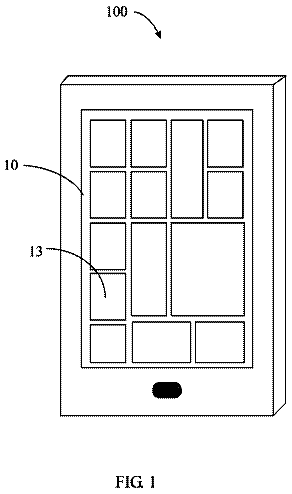
FIG. 1 is a block diagram illustrating a mobile terminal according to an embodiment of the present invention;
FIGS. 2A and 2B are perspective views when a mobile terminal according to an embodiment of the present invention is seen in different directions;
FIG. 3 is a flowchart of a method of controlling a mobile terminal according to an embodiment of the present invention;
FIGS. 4( a ), 4( b ), 4( c ), and 4( d ) are exemplary conceptual diagrams for describing the flowchart of FIG. 3 ;
FIGS. 5( a ), 5( b ), 5( c ), and 5( d ) are exemplary conceptual diagrams for describing a method of outputting a search result of relevant information, in a mobile terminal according to an embodiment of the present invention;
FIGS. 6A (a), 6 A(b), 6 A(c) and 6 B(a), 6 B(b), 6 B(c) are exemplary conceptual diagrams for describing a method of executing a search of relevant information and search cancelation, in a mobile terminal according to an embodiment of the present invention;
FIGS. 7A (a), 7 A(b), 7 A(c), and 7 B(a), 7 B(b), 7 B(c), 7 B(d) are exemplary conceptual diagrams for describing a method of displaying, by category, a search result of relevant information in a mobile terminal according to an embodiment of the present invention;
FIGS. 8A (a), 8 A(b), 8 A(c), 8 A(d) and 8 B(a), 8 B(b), 8 B(c), 8 B(d) are exemplary conceptual diagrams for describing a method of controlling a screen by using an icon corresponding to a search result of relevant information, in a mobile terminal according to an embodiment of the present invention;
FIGS. 9A (a), 9 A(b), 9 A(c) and 9 B(a), 9 B(b), 9 B(c), 9 B(d) are exemplary conceptual diagrams for describing a method of displaying a plurality of search results of a plurality of parts on one screen in a content screen, in a mobile terminal according to an embodiment of the present invention;
FIG. 10 is a flowchart of a method of controlling a mobile terminal according to another embodiment of the present invention;
FIGS. 11A (a), 11 A(b), 11 A(c), and 11 A(d) are exemplary conceptual diagrams for describing a method of controlling a search result of relevant information to disappear, in a mobile terminal according to an embodiment of the present invention; and
FIGS. 11B (a), 11 B(b), 11 B(c), and 11 B(d) are exemplary conceptual diagrams for describing a method of controlling a screen by using a user gesture applied to a part from which a user's interest is released, in a mobile terminal according to an embodiment of the present invention.
Detailed description of the disclosure
Description will now be given in detail according to exemplary embodiments disclosed herein, with reference to the accompanying drawings. For the sake of brief description with reference to the drawings, the same or equivalent components may be provided with the same or similar reference numbers, and description thereof will not be repeated. In general, a suffix such as “module” and “unit” may be used to refer to elements or components. Use of such a suffix herein is merely intended to facilitate description of the specification, and the suffix itself is not intended to give any special meaning or function. In the present disclosure, that which is well-known to one of ordinary skill in the relevant art has generally been omitted for the sake of brevity. The accompanying drawings are used to help easily understand various technical features and it should be understood that the embodiments presented herein are not limited by the accompanying drawings. As such, the present disclosure should be construed to extend to any alterations, equivalents and substitutes in addition to those which are particularly set out in the accompanying drawings.
It will be understood that although the terms first, second, etc. may be used herein to describe various elements, these elements should not be limited by these terms. These terms are generally only used to distinguish one element from another.
It will be understood that when an element is referred to as being “connected with” another element, the element can be connected with the other element or intervening elements may also be present. In contrast, when an element is referred to as being “directly connected with” another element, there are no intervening elements present.
A singular representation may include a plural representation unless it represents a definitely different meaning from the context.
Terms such as “include” or “has” are used herein and should be understood that they are intended to indicate an existence of several components, functions or steps, disclosed in the specification, and it is also understood that greater or fewer components, functions, or steps may likewise be utilized.
Hereinafter, components of a mobile terminal 100 will be explained in more detail with reference to FIG. 1 , before various embodiments are explained.
Regarding the wireless communication unit 110 , the broadcast receiving module 111 is typically configured to receive a broadcast signal and/or broadcast associated information from an external broadcast managing entity via a broadcast channel. The broadcast channel may include a satellite channel, a terrestrial channel, or both. In some embodiments, two or more broadcast receiving modules 111 may be utilized to facilitate simultaneously receiving of two or more broadcast channels, or to support switching among broadcast channels.
The mobile communication module 112 can transmit and/or receive wireless signals to and from one or more network entities. Typical examples of a network entity include a base station, an external mobile terminal, a server, and the like. Such network entities form part of a mobile communication network, which is constructed according to technical standards or communication methods for mobile communications (for example, Global System for Mobile Communication (GSM), Code Division Multi Access (CDMA), CDMA2000 (Code Division Multi Access 2000), EV-DO (Enhanced Voice-Data Optimized or Enhanced Voice-Data Only), Wideband CDMA (WCDMA), High Speed Downlink Packet access (HSDPA), HSUPA (High Speed Uplink Packet Access), Long Term Evolution (LTE), LTE-A (Long Term Evolution-Advanced), and the like).
Examples of wireless signals transmitted and/or received via the mobile communication module 112 include audio call signals, video (telephony) call signals, or various formats of data to support communication of text and multimedia messages.
The wireless Internet module 113 is configured to facilitate wireless Internet access. This module may be internally or externally coupled to the mobile terminal 100 . The wireless Internet module 113 may transmit and/or receive wireless signals via communication networks according to wireless Internet technologies.
Examples of such wireless Internet access include Wireless LAN (WLAN), Wireless Fidelity (Wi-Fi), Wi-Fi Direct, Digital Living Network Alliance (DLNA), Wireless Broadband (WiBro), Worldwide Interoperability for Microwave Access (WiMAX), High Speed Downlink Packet Access (HSDPA), HSUPA (High Speed Uplink Packet Access), Long Term Evolution (LTE), LTE-A (Long Term Evolution-Advanced), and the like. The wireless Internet module 113 may transmit/receive data according to one or more of such wireless Internet technologies, and other Internet technologies as well.
In some embodiments, when the wireless Internet access is implemented according to, for example, WiBro, HSDPA,HSUPA, GSM, CDMA, WCDMA, LTE, LTE-A and the like, as part of a mobile communication network, the wireless Internet module 113 performs such wireless Internet access. As such, the Internet module 113 may cooperate with, or function as, the mobile communication module 112 .
The short-range communication module 114 is configured to facilitate short-range communications. Suitable technologies for implementing such short-range communications include BLUETOOTH™, Radio Frequency IDentification (RFID), Infrared Data Association (IrDA), Ultra-WideBand (UWB), ZigBee, Near Field Communication (NFC), Wireless-Fidelity (Wi-Fi), Wi-Fi Direct, Wireless USB (Wireless Universal Serial Bus), and the like. The short-range communication module 114 in general supports wireless communications between the mobile terminal 100 and a wireless communication system, communications between the mobile terminal 100 and another mobile terminal 100 , or communications between the mobile terminal and a network where another mobile terminal 100 (or an external server) is located, via wireless area networks. One example of the wireless area networks is a wireless personal area networks.
In some embodiments, another mobile terminal (which may be configured similarly to mobile terminal 100 ) may be a wearable device, for example, a smart watch, a smart glass or a head mounted display (HMD), which is able to exchange data with the mobile terminal 100 (or otherwise cooperate with the mobile terminal 100 ). The short-range communication module 114 may sense or recognize the wearable device, and permit communication between the wearable device and the mobile terminal 100 . In addition, when the sensed wearable device is a device which is authenticated to communicate with the mobile terminal 100 , the controller 180 , for example, may cause transmission of data processed in the mobile terminal 100 to the wearable device via the short-range communication module 114 . Hence, a user of the wearable device may use the data processed in the mobile terminal 100 on the wearable device. For example, when a call is received in the mobile terminal 100 , the user may answer the call using the wearable device. Also, when a message is received in the mobile terminal 100 , the user can check the received message using the wearable device.
The location information module 115 is generally configured to detect, calculate, derive or otherwise identify a position of the mobile terminal. As an example, the location information module 115 includes a Global Position System (GPS) module, a Wi-Fi module, or both. If desired, the location information module 115 may alternatively or additionally function with any of the other modules of the wireless communication unit 110 to obtain data related to the position of the mobile terminal.
As one example, when the mobile terminal uses a GPS module, a position of the mobile terminal may be acquired using a signal sent from a GPS satellite. As another example, when the mobile terminal uses the Wi-Fi module, a position of the mobile terminal can be acquired based on information related to a wireless access point (AP) which transmits or receives a wireless signal to or from the Wi-Fi module.
The input unit 120 may be configured to permit various types of input to the mobile terminal 120 . Examples of such input include audio, image, video, data, and user input. Image and video input is often obtained using one or more cameras 121 . Such cameras 121 may process image frames of still pictures or video obtained by image sensors in a video or image capture mode. The processed image frames can be displayed on the display unit 151 or stored in memory 170 . In some cases, the cameras 121 may be arranged in a matrix configuration to permit a plurality of images having various angles or focal points to be input to the mobile terminal 100 . As another example, the cameras 121 may be located in a stereoscopic arrangement to acquire left and right images for implementing a stereoscopic image.
The microphone 122 is generally implemented to permit audio input to the mobile terminal 100 . The audio input can be processed in various manners according to a function being executed in the mobile terminal 100 . If desired, the microphone 122 may include assorted noise removing algorithms to remove unwanted noise generated in the course of receiving the external audio.
The user input unit 123 is a component that permits input by a user. Such user input may enable the controller 180 to control operation of the mobile terminal 100 . The user input unit 123 may include one or more of a mechanical input element (for example, a key, a button located on a front and/or rear surface or a side surface of the mobile terminal 100 , a dome switch, a jog wheel, a jog switch, and the like), or a touch-sensitive input, among others. As one example, the touch-sensitive input may be a virtual key or a soft key, which is displayed on a touch screen through software processing, or a touch key which is located on the mobile terminal at a location that is other than the touch screen. On the other hand, the virtual key or the visual key may be displayed on the touch screen in various shapes, for example, graphic, text, icon, video, or a combination thereof.
The sensing unit 140 is generally configured to sense one or more of internal information of the mobile terminal, surrounding environment information of the mobile terminal, user information, or the like. The controller 180 generally cooperates with the sending unit 140 to control operation of the mobile terminal 100 or execute data processing, a function or an operation associated with an application program installed in the mobile terminal based on the sensing provided by the sensing unit 140 . The sensing unit 140 may be implemented using any of a variety of sensors, some of which will now be described in more detail.
The proximity sensor 141 may include a sensor to sense presence or absence of an object approaching a surface, or an object located near a surface, by using an electromagnetic field, infrared rays, or the like without a mechanical contact. The proximity sensor 141 may be arranged at an inner region of the mobile terminal covered by the touch screen, or near the touch screen.
The proximity sensor 141 , for example, may include any of a transmissive type photoelectric sensor, a direct reflective type photoelectric sensor, a mirror reflective type photoelectric sensor, a high-frequency oscillation proximity sensor, a capacitance type proximity sensor, a magnetic type proximity sensor, an infrared rays proximity sensor, and the like. When the touch screen is implemented as a capacitance type, the proximity sensor 141 can sense proximity of a pointer relative to the touch screen by changes of an electromagnetic field, which is responsive to an approach of an object with conductivity. In this case, the touch screen (touch sensor) may also be categorized as a proximity sensor.
The term “proximity touch” will often be referred to herein to denote the scenario in which a pointer is positioned to be proximate to the touch screen without contacting the touch screen. The term “contact touch” will often be referred to herein to denote the scenario in which a pointer makes physical contact with the touch screen. For the position corresponding to the proximity touch of the pointer relative to the touch screen, such position will correspond to a position where the pointer is perpendicular to the touch screen. The proximity sensor 141 may sense proximity touch, and proximity touch patterns (for example, distance, direction, speed, time, position, moving status, and the like).
In general, controller 180 processes data corresponding to proximity touches and proximity touch patterns sensed by the proximity sensor 141 , and cause output of visual information on the touch screen. In addition, the controller 180 can control the mobile terminal 100 to execute different operations or process different data according to whether a touch with respect to a point on the touch screen is either a proximity touch or a contact touch.
A touch sensor can sense a touch applied to the touch screen, such as display unit 151 , using any of a variety of touch methods. Examples of such touch methods include a resistive type, a capacitive type, an infrared type, and a magnetic field type, among others.
As one example, the touch sensor may be configured to convert changes of pressure applied to a specific part of the display unit 151 , or convert capacitance occurring at a specific part of the display unit 151 , into electric input signals. The touch sensor may also be configured to sense not only a touched position and a touched area, but also touch pressure and/or touch capacitance. A touch object is generally used to apply a touch input to the touch sensor. Examples of typical touch objects include a finger, a touch pen, a stylus pen, a pointer, or the like.
When a touch input is sensed by a touch sensor, corresponding signals may be transmitted to a touch controller. The touch controller may process the received signals, and then transmit corresponding data to the controller 180 . Accordingly, the controller 180 may sense which region of the display unit 151 has been touched. Here, the touch controller may be a component separate from the controller 180 , the controller 180 , and combinations thereof.
In some embodiments, the controller 180 may execute the same or different controls according to a type of touch object that touches the touch screen or a touch key provided in addition to the touch screen. Whether to execute the same or different control according to the object which provides a touch input may be decided based on a current operating state of the mobile terminal 100 or a currently executed application program, for example.
The touch sensor and the proximity sensor may be implemented individually, or in combination, to sense various types of touches. Such touches includes a short (or tap) touch, a long touch, a multi-touch, a drag touch, a flick touch, a pinch-in touch, a pinch-out touch, a swipe touch, a hovering touch, and the like.
If desired, an ultrasonic sensor may be implemented to recognize position information relating to a touch object using ultrasonic waves. The controller 180 , for example, may calculate a position of a wave generation source based on information sensed by an illumination sensor and a plurality of ultrasonic sensors. Since light is much faster than ultrasonic waves, the time for which the light reaches the optical sensor is much shorter than the time for which the ultrasonic wave reaches the ultrasonic sensor. The position of the wave generation source may be calculated using this fact. For instance, the position of the wave generation source may be calculated using the time difference from the time that the ultrasonic wave reaches the sensor based on the light as a reference signal.
The camera 121 typically includes at least one a camera sensor (CCD, CMOS etc.), a photo sensor (or image sensors), and a laser sensor.
The input unit 120 includes a camera 121 for obtaining images or video, a microphone 122 , which is one type of audio input device for inputting an audio signal, and a user input unit 123 (for example, a touch key, a push key, a mechanical key, a soft key, and the like) for allowing a user to input information. Data (for example, audio, video, image, and the like) is obtained by the input unit 120 and may be analyzed and processed by controller 180 according to device parameters, user commands, and combinations thereof.
The sensing unit 140 is typically implemented using one or more sensors configured to sense internal information of the mobile terminal, the surrounding environment of the mobile terminal, user information, and the like. For example, in FIG. 1A , the sensing unit 140 is shown having a proximity sensor 141 and an illumination sensor 142 .
If desired, the sensing unit 140 may alternatively or additionally include other types of sensors or devices, such as a touch sensor, an acceleration sensor, a magnetic sensor, a G-sensor, a gyroscope sensor, a motion sensor, an RGB sensor, an infrared (IR) sensor, a finger scan sensor, a ultrasonic sensor, an optical sensor (for example, camera 121 ), a microphone 122 , a battery gauge, an environment sensor (for example, a barometer, a hygrometer, a thermometer, a radiation detection sensor, a thermal sensor, and a gas sensor, among others), and a chemical sensor (for example, an electronic nose, a health care sensor, a biometric sensor, and the like), to name a few. The mobile terminal 100 may be configured to utilize information obtained from sensing unit 140 , and in particular, information obtained from one or more sensors of the sensing unit 140 , and combinations thereof.
The output unit 150 is typically configured to output various types of information, such as audio, video, tactile output, and the like. The output unit 150 is shown having a display unit 151 , an audio output module 152 , a haptic module 153 , and an optical output module 154 .
The display unit 151 may have an inter-layered structure or an integrated structure with a touch sensor in order to facilitate a touch screen. The touch screen may provide an output interface between the mobile terminal 100 and a user, as well as function as the user input unit 123 which provides an input interface between the mobile terminal 100 and the user.
The interface unit 160 serves as an interface with various types of external devices that can be coupled to the mobile terminal 100 . The interface unit 160 , for example, may include any of wired or wireless ports, external power supply ports, wired or wireless data ports, memory card ports, ports for connecting a device having an identification module, audio input/output (I/O) ports, video I/O ports, earphone ports, and the like. In some cases, the mobile terminal 100 may perform assorted control functions associated with a connected external device, in response to the external device being connected to the interface unit 160 .
The memory 170 is typically implemented to store data to support various functions or features of the mobile terminal 100 . For instance, the memory 170 may be configured to store application programs executed in the mobile terminal 100 , data or instructions for operations of the mobile terminal 100 , and the like. Some of these application programs may be downloaded from an external server via wireless communication. Other application programs may be installed within the mobile terminal 100 at time of manufacturing or shipping, which is typically the case for basic functions of the mobile terminal 100 (for example, receiving a call, placing a call, receiving a message, sending a message, and the like). It is common for application programs to be stored in the memory 170 , installed in the mobile terminal 100 , and executed by the controller 180 to perform an operation (or function) for the mobile terminal 100 .
The controller 180 typically functions to control overall operation of the mobile terminal 100 , in addition to the operations associated with the application programs. The controller 180 may provide or process information or functions appropriate for a user by processing signals, data, information and the like, which are input or output by the various components depicted in FIG. 1A , or activating application programs stored in the memory 170 . As one example, the controller 180 controls some or all of the components illustrated in FIGS. 1A-1C according to the execution of an application program that have been stored in the memory 170 .
The power supply unit 190 can be configured to receive external power or provide internal power in order to supply appropriate power required for operating elements and components included in the mobile terminal 100 . The power supply unit 190 may include a battery, and the battery may be configured to be embedded in the terminal body, or configured to be detachable from the terminal body.
Referring still to FIG. 1A , various components depicted in this figure will now be described in more detail. Regarding the wireless communication unit 110 , the broadcast receiving module 111 is typically configured to receive a broadcast signal and/or broadcast associated information from an external broadcast managing entity via a broadcast channel. The broadcast channel may include a satellite channel, a terrestrial channel, or both. In some embodiments, two or more broadcast receiving modules 111 may be utilized to facilitate simultaneously receiving of two or more broadcast channels, or to support switching among broadcast channels.
The broadcast signal may be encoded according to any of a variety of technical standards or broadcasting methods (for example, Digital Video Broadcast (DVB), Advanced Television Systems Committee (ATSC), and the like) for transmission and reception of digital broadcast signals. The broadcast receiving module 111 can receive the digital broadcast signals using a method appropriate for the transmission method utilized.
Examples of broadcast associated information may include information associated with a broadcast channel, a broadcast program, a broadcast event, a broadcast service provider, or the like. The broadcast associated information may also be provided via a mobile communication network, and in this case, received by the mobile communication module 112 .
The broadcast associated information may be implemented in various formats. For instance, broadcast associated information may include an Electronic Program Guide (EPG) of Digital Multimedia Broadcasting (DMB), an Electronic Service Guide (ESG) of Digital Video Broadcast-Handheld (DVB-H), and the like. Broadcast signals and/or broadcast associated information received via the broadcast receiving module 111 may be stored in a suitable device, such as a memory 170 .
The mobile communication module 112 can transmit and/or receive wireless signals to and from one or more network entities. Typical examples of a network entity include a base station, an external mobile terminal, a server, and the like. Such network entities form part of a mobile communication network, which is constructed according to technical standards or communication methods for mobile communications (for example, Global System for Mobile Communication (GSM), Code Division Multi Access (CDMA), CDMA2000 (Code Division Multi Access 2000), EV-DO (Enhanced Voice-Data Optimized or Enhanced Voice-Data Only), Wideband CDMA (WCDMA), High Speed Downlink Packet access (HSDPA), HSUPA (High Speed Uplink Packet Access), Long Term Evolution (LTE), LTE-A (Long Term Evolution-Advanced), and the like).
Examples of wireless signals transmitted and/or received via the mobile communication module 112 include audio call signals, video (telephony) call signals, or various formats of data to support communication of text and multimedia messages.
The wireless Internet module 113 is configured to facilitate wireless Internet access. This module may be internally or externally coupled to the mobile terminal 100 . The wireless Internet module 113 may transmit and/or receive wireless signals via communication networks according to wireless Internet technologies.
Examples of such wireless Internet access include Wireless LAN (WLAN), Wireless Fidelity (Wi-Fi), Wi-Fi Direct, Digital Living Network Alliance (DLNA), Wireless Broadband (WiBro), Worldwide Interoperability for Microwave Access (WiMAX), High Speed Downlink Packet Access (HSDPA), Long Term Evolution (LTE), and the like. The wireless Internet module 113 may transmit/receive data according to one or more of such wireless Internet technologies, and other Internet technologies as well.
In some embodiments, when the wireless Internet access is implemented according to, for example, WiBro, HSDPA,HSUPA, GSM, CDMA, WCDMA, LTE, LTE-A and the like, as part of a mobile communication network, the wireless Internet module 113 performs such wireless Internet access. As such, the Internet module 113 may cooperate with, or function as, the mobile communication module 112 .
The short-range communication module 114 is configured to facilitate short-range communications. Suitable technologies for implementing such short-range communications include BLUETOOTH™, Radio Frequency IDentification (RFID), Infrared Data Association (IrDA), Ultra-WideBand (UWB), ZigBee, Near Field Communication (NFC), Wireless-Fidelity (Wi-Fi), Wi-Fi Direct, Wireless USB (Wireless Universal Serial Bus), and the like. The short-range communication module 114 in general supports wireless communications between the mobile terminal 100 and a wireless communication system, communications between the mobile terminal 100 and another mobile terminal 100 , or communications between the mobile terminal and a network where another mobile terminal 100 (or an external server) is located, via wireless area networks. One example of the wireless area networks is a wireless personal area networks.
The description continues in the full USPTO document.
 Lapsed, fee not paid13 drawings