 Lapsed, fee not paid7 drawings
Software & Apps · US 9,747,514 B2
Noise filtering and image sharpening utilizing common spatial support
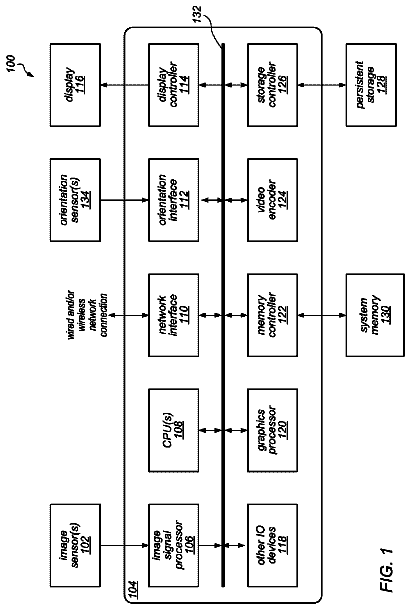
An image processing pipeline may perform noise filtering and image sharpening utilizing common spatial support.
US 9,747,579 B2 · Assignee: THE INVENTION SCIENCE FUND I, LLC · Inventors: Jung; Edward K. Y. et al.
Sheet 1 of 7 from the published document. All sheets in the USPTO PDF
Methods, devices, and systems that provide enhanced user assistance. A method includes receiving a query related to an electronic device through a first interface associated with the electronic device, and providing an assistance corresponding to the query through a second interface associated with the electronic device. A system includes an electronic device including a first interface and a second interface. The system further includes instructions which when implemented in the electronic device cause the electronic device to receive a query related to the electronic device through a first interface associated with the electronic device, and provide an assistance corresponding to the query through a second interface associated with the electronic device.
1 of 7 drawing sheets so far from the published document, cropped to the drawing. Every sheet is in the USPTO PDF.
What the patent claimed, word for word. All of it is now free to use.
In an event of any inconsistencies between the instant application and an application incorporated by reference, the instant application controls.
An embodiment provides a method. The method includes receiving a query related to an electronic device through a first interface associated with the electronic device, and providing an assistance corresponding to the query through a second interface associated with the electronic device. The first interface may include an element of the electronic device in a first state and the second interface may include the element of the electronic device in a second state. The first interface may include an element of the electronic device in a first mode and the second interface may include the element of the electronic device in a second mode. The receiving a query related to the electronic device may include receiving an assistance request related to the electronic device. The receiving a query related to an electronic device through a first interface associated with the electronic device may include receiving a selection of an aspect of the electronic device through a first interface associated with the electronic device. The receiving a selection of an aspect of the electronic device through a first interface associated with the electronic device may include detecting a user selection of an aspect of the electronic device through a first interface associated with the aspect of the electronic device. The first interface associated with an aspect of the electronic device may include a first interface physically associated with an aspect of the electronic device. The first interface associated with an aspect of the electronic device may include a first interface virtually associated with the aspect of the electronic device. The receiving a selection of an aspect of the electronic device through a first interface associated with the electronic device may include detecting a touch through a first interface associated with the electronic device. The receiving a selection of an aspect of the electronic device may include receiving a selection of a component associated with the electronic device. The receiving a selection of an aspect of the electronic device may include receiving a selection of a function associated with the electronic device, which may include receiving a selection of a program associated with the electronic device, and may include receiving a selection of a process associated with the electronic device.
The receiving a query through a first interface may include receiving a query through a first user interface, which may include detecting a touch to the first user interface. The receiving a query through a first interface may include detecting a sound through the first interface, which may include detecting a sound of a spoken word through the first interface. The electronic device may include a computing device and the receiving a query may include receiving a query related to an aspect of the computing device. The electronic device may include an electrical appliance and the receiving a query may include receiving a query related to an aspect of the electrical appliance. The electronic device may include a limited resource computing device and the receiving query may include receiving a query related to an aspect of the limited resource computing device. The electronic device may include a pervasive computing device and the receiving a query may include receiving a query related to an aspect of the pervasive computing device. The electronic device may include a digital appliance and the receiving a query may include receiving a query related to an aspect of the digital appliance.
The providing an assistance may include providing a user assistance, which may include visually providing a user assistance. The providing an assistance may include providing an audible assistance, a spoken assistance, and/or a tactile assistance. The providing an assistance may include providing a guided response assistance, and/or an interactive tutorial assistance. The providing an assistance may include providing an assistance corresponding with a physical element of the electronic device, which may include blinking a light emitter associated with the physical element. The providing an assistance may include providing a guidance corresponding with a process associated with the electronic device. The providing an assistance may include providing a description of an aspect of the electronic device. The providing an assistance may include providing an assistance showing how an aspect of the device works.
The method may further include searching an assistance file for an assistance correlating with the query. An embodiment may also include a computer-readable medium containing computer instructions which, when run on a computing device, cause the computing device to perform the above provided method. The computer-readable medium may include a computer storage medium, and the computer storage medium may be carried by a computer readable carrier. The computer-readable medium may include a communications medium.
Another embodiment provides a system. The system includes an electronic device including a first interface and a second interface. The system further includes instructions which when implemented in the electronic device cause the electronic device to receive a query related to the electronic device through a first interface associated with the electronic device, and provide an assistance corresponding to the query through a second interface associated with the electronic device. The first interface may include an element of the electronic device in a first state and the second interface may include the element of the electronic device in a second state. The first interface may include an element of the electronic device in a first mode and the second interface may include the element of the electronic device in a second mode. The first interface may include a first user interface. The second interface may include a second user interface. The first interface and the second interface may be at least substantially similar, and the second user interface may include the first user interface. The first interface may include a button, which may include a tangible button and a virtual button. The first interface may include a visual display. The visual display may include a visual display surface, and may include a light emitter.
A further embodiment provides an apparatus. The apparatus includes a means associated with an electronic device for receiving a query related to the electronic device, and a means associated with the electronic device for providing an assistance corresponding to the query.
An embodiment provides a system. The system includes a query module operable to receive a query related to an electronic device through a first interface associated with an electronic device, and an assistance module operable to provide an assistance corresponding to the query through a second interface associated with the electronic device.
An embodiment provides a method. The method includes receiving a query related to an aspect of an electronic device through a first user interface, and providing the assistance corresponding to the query through a second user interface of the electronic device. The first user interface may include a first user interface associated with the aspect of the electronic device, which may include a first user interface physically associated with the aspect of the electronic device. The first user interface associated with the aspect of the electronic device may include a first user interface virtually associated with the aspect of the electronic device. The first user interface may include a first user interface proximately associated with the aspect of the electronic device. The first user interface may include a first user interface virtually associated with the aspect of the electronic device. The electronic device may include a limited resource computing device and the receiving a query may include receiving a query related an aspect of the limited resource computing device. The method may further include searching an assistance file for an assistance correlating with the query.
Another embodiment provides a system. The system includes an electronic device having a plurality of user interfaces, an assistance file having a content related to the electronic device, and an assistance manager. The assistance manager includes instructions that when implemented in the electronic device cause the electronic device to receive a query related to the electronic device through a first user interface of the plurality of user interfaces, search the assistance file for an assistance corresponding to the query, and provide the assistance corresponding to the query through a second user interface of the plurality of user interfaces. The computing device may include a storage medium operable to store the assistance file.
A further embodiment provides an apparatus. The apparatus includes a means associated with an aspect of an electronic device for receiving a query related to the aspect of the electronic device, a means for searching an assistance file for an assistance correlating with the query, and a means associated with the aspect of the electronic device for providing the assistance corresponding to the query.
An embodiment provides a system. The system includes a query module operable to receive a query related to an electronic device through a first interface associated with an electronic device. The system also includes a search module operable to search an assistance file for an assistance correlating with the query, and an assistance module operable to provide an assistance corresponding to the query through a second interface associated with the electronic device.
In addition to the foregoing, various other method and/or system aspects are set forth and described in the text (e.g., claims and/or detailed description) and/or drawings of the present application.
The foregoing is a summary and thus contains, by necessity, simplifications, generalizations and omissions of detail; consequently, those skilled in the art will appreciate that the summary is illustrative only and is not intended to be in any way limiting. Other aspects, inventive features, and advantages of the devices and/or processes described herein, as defined solely by the claims, will become apparent in the detailed description set forth herein.
FIG. 1 illustrates an exemplary system in which embodiments may be implemented, including a thin computing device and a functional element of an electronic device;
FIG. 2 illustrates another exemplary system in which embodiments may be implemented, including a general-purpose computing device;
FIG. 3 is a flow diagram illustrating an exemplary operation that provides assistance;
FIG. 4 is a flow diagram illustrating additional detail related to an alternative embodiment of the exemplary query operation of FIG. 3 ;
FIG. 5 is a flow diagram illustrating an exemplary operation supplementing the exemplary query operation that provides assistance described in conjunction with FIG. 3 ;
FIG. 6 illustrates an exemplary system in which embodiments may be implemented; and
FIG. 7 is a flow diagram illustrating an exemplary operation that receives assistance requests, which may come from an inputter, such as a human user DETAILED DESCRIPTION
In the following detailed description of exemplary embodiments, reference is made to the accompanying drawings, which form a part hereof. In the several figures, like referenced numerals identify like elements. The detailed description and the drawings illustrate exemplary embodiments. Other embodiments may be utilized, and other changes may be made, without departing from the spirit or scope of the subject matter presented here. The following detailed description is therefore not to be taken in a limiting sense, and the scope of the claimed subject matter is defined by the appended claims.
Features, functionality, and options of computing devices, such as personal computers, have rapidly advanced as technology provides increased processor speeds, storage capacity, connectivity, and interconnectivity, all at decreased cost. At the same time, software, programs, games, and procedures have similarly rapidly advanced. Additionally, rapid advances have been made in interconnectability and interoperability of computing devices and other devices, such as handheld devices and cell phones. These advances are intended to provide a user with many benefits. However, realization of these benefits may require that a user read and re-read manuals.
When new, a user may or many not take the trouble to read a manual. Manuals are sometimes considered too complex and troublesome to comprehend. As a result, the advances may be unused and the user dissatisfied. A user may benefit from being able to input a selection of an aspect of a computer relevant to a need or question through a user interface associated with the aspect, and then let the computer guide them from there using the same or another user interface of the computer.
Additionally, manuals are sometimes lost, misplaced, or unavailable, such as for example, when traveling. A user may further benefit by being able to obtain assistance directly from the computer of a nature often provided by a comprehensive user manual.
Further, as a result of rapidly advancing computer technology, computing devices are become smaller, more powerful, and cheaper. The advancing computing technology is moving beyond the personal computer and into everyday items and devices, providing embedded technology and connectivity. Almost any thing or item, from buildings to clothing, from telephones to tools, from appliances to cars, from homes to the human body, from personal information devices to a common a coffee mug, can have an embedded electronic device that includes a thin computing device. The embedded electronic device typically improves performance and capacity of a basic functionality of the item, and may connect the item with a network of other items or the Internet. These items with embedded electronic devices may be described using a variety of names, which may not have a bright line distinction between them. Commonly used names include a limited resource computing device, limited capacity computing device, ubiquitous computing device, pervasive computing device, digital appliance, and Internet appliance. Such items may be collectively referred to herein from time-to-time as “pervasive computing,” or a “pervasive computing device” for economy of words and to aid in reading and understanding embodiments disclosed herein.
Pervasive computing provides increased functionality, it often requires increased interaction between a user and a previously dumb device. Pervasive computing devices, such as conventional telephones, cell phones, smart phones, pocket organizers, and personal digital assistants, often present a user with widely varying user interface protocols. This may contribute to user confusion about an aspect of the pervasive computing device they are viewing, such as a particular button. As a result, simply finding appropriate aspects of the device related to a portion of the user manual may be difficult or impossible. Like a computer user, a pervasive computing device user may benefit from interactive assistance.
Rapidly advancing technology may also provide an opportunity for increased interaction between traditionally dumb items and user manuals. Many dumb items have become more complex and sophisticated to meet user demand. For example, simply adjusting an ergonomic chair requires complex instructions and location of knobs placed at odd locations. User manuals have correspondingly become more complex and sometimes confusing. As a result, simply finding appropriate aspects of the item related to a portion of the user manual may be difficult or impossible. A user may benefit from interactive assistance with these traditionally dumb items.
FIG. 1 and the following discussion are intended to provide a brief, general description of an environment in which embodiments may be implemented. FIG. 1 illustrates an exemplary system that includes a thin computing device 20 of an electronic device that also includes device functional element 50 . For example, the electronic device may include any item having electrical and/or electronic components playing a role in a functionality of the item, such as a limited resource computing device, a digital camera, a cell phone, a printer, a refrigerator, a car, and an airplane. The thin computing device 20 includes a processing unit 21 , a system memory 22 , and a system bus 23 that couples various system components including the system memory 22 to the processing unit 21 . The system bus 23 may be any of several types of bus structures including a memory bus or memory controller, a peripheral bus, and a local bus using any of a variety of bus architectures. The system memory includes read-only memory (ROM) 24 and random access memory (RAM) 25 . A basic input/output system (BIOS) 26 , containing the basic routines that help to transfer information between sub-components within the thin computing device 20 , such as during start-up, is stored in the ROM 24 . A number of program modules may be stored in the ROM 24 and/or RAM 25 , including an operating system 28 , one or more application programs 29 , other program modules 30 and program data 31 .
A user may enter commands and information into the computing device 20 through input devices, such as a number of switches and buttons, illustrated as hardware buttons 44 , connected to the system via a suitable interface 45 . Input devices may further include a touch-sensitive display screen 32 with suitable input detection circuitry 33 ). The output circuitry of the touch-sensitive display 32 is connected to the system bus 23 via a video driver 37 . Other input devices may include a microphone 34 connected through a suitable audio interface 35 , and a physical hardware keyboard (not shown). In addition to the display 32 , the computing device 20 may include other peripheral output devices, such as at least one speaker 38 .
Other external input or output devices 39 , such as a joystick, game pad, satellite dish, scanner or the like may be connected to the processing unit 21 through a USB port 40 and USB port interface 41 , to the system bus 23 . Alternatively, the other external input and output devices 39 may be connected by other interfaces, such as a parallel port, game port or other port. The computing device 20 may further include or be capable of connecting to a flash card memory (not shown) through an appropriate connection port (not shown). The computing device 20 may further include or be capable of connecting with a network through a network port 42 and network interface 43 , and through wireless port 46 and corresponding wireless interface 47 may be provided to facilitate communication with other peripheral devices, including other computers, printers, and so on (not shown). It will be appreciated that the various components and connections shown are exemplary and other components and means of establishing communications links may be used.
The computing device 20 may be primarily designed to include a user interface having a character, key-based, other user data input via the touch sensitive display 32 using a stylus (not shown). Moreover, the user interface is not limited to an actual touch-sensitive panel arranged for directly receiving input, but may alternatively or in addition respond to another input device, such as the microphone 34 . For example, spoken words may be received at the microphone 34 and recognized. Alternatively, the computing device 20 may be designed to include a user interface having a physical keyboard (not shown).
The device functional elements 50 are typically application specific and related to a function of the electronic device, and is coupled with the system bus 23 through an interface (not shown). The functional element may typically perform a single well-defined task with little or no user configuration or setup, such as a refrigerator keeping food cold, a cell phone connecting with an appropriate tower and transceiving voice or data information, and a camera capturing and saving an image.
FIG. 2 illustrates another exemplary system on which embodiments of may be implemented. FIG. 2 illustrates an electronic device that may correspond in whole or part to a general-purpose computing device, shown as a computer 100 . Components of the computer 100 may include, but are not limited to, a processing unit 120 , a system memory 130 , and a system bus 121 that couples various system components including the system memory to the processing unit 120 . The system bus 121 may be any of several types of bus structures including a memory bus or memory controller, a peripheral bus, and a local bus using any of a variety of bus architectures. By way of example, and not limitation, such architectures include Industry Standard Architecture (ISA) bus, Micro Channel Architecture (MCA) bus, Enhanced ISA (EISA) bus, Video Electronics Standards Association (VESA) local bus, and Peripheral Component Interconnect (PCI) bus, also known as Mezzanine bus.
The computer 100 typically includes a variety of computer-readable media. Computer-readable media can be any available media that can be accessed by the computer 100 and include both volatile and nonvolatile media, removable and non-removable media. By way of example, and not limitation, computer-readable media may include computer storage media and communications media. Computer storage media includes both volatile and nonvolatile, removable and non-removable media implemented in any method or technology for storage of information such as computer-readable instructions, data structures, program modules, or other data. Computer storage media include, but are not limited to, random-access memory (RAM), read-only memory (ROM), electrically erasable programmable read-only memory (EEPROM), flash memory, or other memory technology, CD-ROM, digital versatile disks (DVD), or other optical disk storage, magnetic cassettes, magnetic tape, magnetic disk storage, or other magnetic storage devices, or any other medium which can be used to store the desired information and which can be accessed by the computer 100 . Communications media typically embody computer-readable instructions, data structures, program modules, or other data in a modulated data signal such as a carrier wave or other transport mechanism and include any information delivery media. The term “modulated data signal” means a signal that has one or more of its characteristics set or changed in such a manner as to encode information in the signal. By way of example, and not limitation, communications media include wired media such as a wired network and a direct-wired connection and wireless media such as acoustic, RF, optical, and infrared media. Combinations of the any of the above should also be included within the scope of computer-readable media.
The system memory 130 includes computer storage media in the form of volatile and nonvolatile memory such as ROM 131 and RAM 132 . A basic input/output system (BIOS) 133 , containing the basic routines that help to transfer information between elements within the computer 100 , such as during start-up, is typically stored in ROM 131 . RAM 132 typically contains data and program modules that are immediately accessible to or presently being operated on by processing unit 120 . By way of example, and not limitation, FIG. 2 illustrates an operating system 134 , application programs 135 , other program modules 136 , and program data 137 . Often, the operating system 134 offers services to applications programs 135 by way of one or more application programming interfaces (APIs) (not shown). Because the operating system 134 incorporates these services, developers of applications programs 135 need not redevelop code to use the services. Examples of APIs provided by operating systems such as Microsoft's “WINDOWS” are well known in the art.
The computer 100 may also include other removable/non-removable, volatile/nonvolatile computer storage media. By way of example only, FIG. 2 illustrates a non-removable non-volatile memory interface (hard disk interface) 140 that reads from and writes to non-removable, nonvolatile magnetic media, a magnetic disk drive 151 that reads from and writes to a removable, nonvolatile magnetic disk 152 , and an optical disk drive 155 that reads from and writes to a removable, nonvolatile optical disk 156 such as a CD ROM. Other removable/nonremovable, volatile/nonvolatile computer storage media that can be used in the exemplary operating environment include, but are not limited to, magnetic tape cassettes, flash memory cards, DVDs, digital video tape, solid state RAM, and solid state ROM. The hard disk drive 141 is typically connected to the system bus 121 through a non-removable memory interface, such as the interface 140 , and magnetic disk drive 151 and optical disk drive 155 are typically connected to the system bus 121 by a removable memory interface, such as interface 150 .
The drives and their associated computer storage media discussed above and illustrated in FIG. 2 provide storage of computer-readable instructions, data structures, program modules, and other data for the computer 100 . In FIG. 2 , for example, hard disk drive 141 is illustrated as storing an operating system 144 , application programs 145 , other program modules 146 , and program data 147 . Note that these components can either be the same as or different from the operating system 134 , application programs 135 , other program modules 136 , and program data 137 . The operating system 144 , application programs 145 , other program modules 146 , and program data 147 are given different numbers here to illustrate that, at a minimum, they are different copies. A user may enter commands and information into the computer 100 through input devices such as a microphone 163 , keyboard 162 and pointing device 161 , commonly referred to as a mouse, trackball, or touch pad. Other input devices (not shown) may include a joystick, game pad, satellite dish, and scanner. These and other input devices are often connected to the processing unit 120 through a user input interface 160 that is coupled to the system bus, but may be connected by other interface and bus structures, such as a parallel port, game port, or a universal serial bus (USB). A monitor 191 or other type of display device is also connected to the system bus 121 via an interface, such as a video interface 190 . In addition to the monitor, computers may also include other peripheral output devices such as speakers 197 and printer 196 , which may be connected through an output peripheral interface 195 .
The computer 100 may operate in a networked environment using logical connections to one or more remote computers, such as a remote computer 180 . The remote computer 180 may be a personal computer, a server, a router, a network PC, a peer device, or other common network node, and typically includes many or all of the elements described above relative to the computer 100 , although only a memory storage device 181 has been illustrated in FIG. 2 . The logical connections depicted in FIG. 2 include a local area network (LAN) 171 and a wide area network (WAN) 173 , but may also include other networks such as a personal area network (PAN) (not shown). Such networking environments are commonplace in offices, enterprise-wide computer networks, intranets, and the Internet.
When used in a LAN networking environment, the computer 100 is connected to the LAN 171 through a network interface or adapter 170 . When used in a WAN networking environment, the computer 100 typically includes a modem 172 or other means for establishing communications over the WAN 173 , such as the Internet. The modem 172 , which may be internal or external, may be connected to the system bus 121 via the user input interface 160 , or via another appropriate mechanism. In a networked environment, program modules depicted relative to the computer 100 , or portions thereof, may be stored in a remote memory storage device. By way of example, and not limitation, FIG. 2 illustrates remote application programs 185 as residing on memory device 181 . It will be appreciated that the network connections shown are exemplary and other means of establishing a communications link between the computers may be used.
In the description that follows, embodiments will be described with reference to acts and symbolic representations of operations that are performed by one or more computing devices, such a computing device 20 of FIG. 1 and/or computer 100 of FIG. 2 , unless indicated otherwise. As such, it will be understood that such acts and operations, which are at times referred to as being computer-executed, include the manipulation by the processing unit of the computer of electrical signals representing data in a structured form. This manipulation transforms the data or maintains them at locations in the memory system of the computer, which reconfigures or otherwise alters the operation of the computer in a manner well understood by those skilled in the art. The data structures where data are maintained are physical locations of the memory that have particular properties defined by the format of the data. However, while an embodiment is being described in the foregoing context, it is not meant to be limiting as those of skill in the art will appreciate that the acts and operations described hereinafter may also be implemented in hardware.
FIGS. 1 and 2 illustrate an example of a suitable environment on which embodiments may be implemented. The computing device 20 of FIG. 1 and/or computer 100 of FIG. 2 are only examples of a suitable environment and are not intended to suggest any limitation as to the scope of use or functionality of an embodiment. Neither should the environment be interpreted as having any dependency or requirement relating to any one or combination of components illustrated in an exemplary operating environment.
Embodiments may be implemented with numerous other general-purpose or special-purpose computing devices and computing system environments or configurations. Examples of well-known computing systems, environments, and configurations that may be suitable for use with an embodiment include, but are not limited to, personal computers, server computers, hand-held or laptop devices, personal digital assistants, multiprocessor systems, microprocessor-based systems, set top boxes, programmable consumer electronics, network PCs, minicomputers, mainframe computers, and distributed computing environments that include any of the above systems or devices.
Embodiments may be described in a general context of computer-executable instructions, such as program modules, being executed by a computer. Generally, program modules include routines, programs, objects, components, data structures, etc., that perform particular tasks or implement particular abstract data types. An embodiment may also be practiced in distributed computing environments where tasks are performed by remote processing devices that are linked through a communications network. In a distributed computing environment, program modules may be located in both local and remote computer storage media including memory storage devices.
FIG. 3 is a flow diagram illustrating an exemplary operation 200 that provides assistance. After a start operation, the operation moves to operation 210 . At activation operation 210 , an assistance manager is activated. The assistance manager typically includes instructions, such as computer readable instructions, for example, a program, process, and/or application operating on an electronic device that implements the exemplary operation 200 that provides assistance.
At query operation 220 , a query related to an electronic device is received through a first interface associated with the electronic device. The query may include a selection of an aspect of the electronic device as a subject of the query. The query may include any aspect of the electronic device for which a user might desire assistance, such as, a feature of the device, an element of the device, and a process associated with the device. The query related to the electronic device may include an assistance request related to the electronic device. The assistance request may include a request related to the electronic device in any manner, including the selected aspect of the electronic device. For example, the assistance request may include any request related to the electronic device, such as “show me,” “demonstrate,” and “guide me.” The first interface may include a first user interface.
The electronic device may be incorporated into any type of appliance and/or item. In certain embodiments, the electronic device may include a computing device, such as a personal computer and a server. In other embodiments, the electronic device may include a limited resource computing device, an appliance, a pervasive computing device, and a digital appliance. Examples may include a PDA, a cell phone, a Blackberry appliance, an on-board computing device, such as in a car, boat, and/or aircraft, an X-Box, a home gateway, a set-top box, a point-of-sale terminal, a digital camera, a TiVo, and an automated teller machine. By way of further example, the electronic device may include a computing device and the query may relate to an aspect of the computing device. The electronic device may include an electrical appliance and the query may relate to an aspect of the electrical appliance. The electronic device may include a limited resource computing device and the query may relate to an aspect of the limited resource computing device. The electronic device may include a pervasive computing device and the query may relate to an aspect of the pervasive computing device. The electronic device may include a digital appliance and the query may relate to an aspect of the digital appliance.
At search operation 230 , an assistance file is searched for an assistance response correlating to the query. Searching the assistance file may include searching an assistance file stored in a storage media associated with the electronic device, such as the system memory 22 of FIG. 1 , or coupled with the electronic device. Alternatively, the assistance file may be stored and/or searched remotely and coupled with a functionality of the operation 230 , such as by a network, such as a LAN, a WAN, or the Internet.
At assistance operation 240 , an assistance response is provided correlating to the query through a second interface of the electronic device. In an embodiment, the assistance response provided may include visually providing an assistance with a physical element of the device, such as blinking a light associated with the physical element. For example, the physical element may be a physical button and the light may be a light emitting device incorporated into the button. In this example, the assistance may include blinking the LED associated with the button. In an alternative embodiment, the second interface may include an LED and a third interface may include a speaker. The provided assistance may include providing an audible assistance presentation from the speaker and blinking the LED appropriately during the presentation. The audible assistance presentation may include a spoken presentation that includes a word or words. The providing an assistance further may include tactilely providing an assistance presentation.
The provided assistance may include guidance through a process associated with the aspect of the device, a description of the aspect of the device, a showing how the aspect of the device works, and/or an interactive tutorial. The assistance may be provided in any manner, such as a visual presentation, an audio presentation, a spoken presentation, a tactile presentation, and/or a combination of two or more of these manners of presentation.
In an embodiment, the second interface may be a second user interface. The second user interface may include a visual display, a graphical display, and a graphical user interface. The second user interface may include an audio display, such as an acoustic speaker. Further, the second user interface may include a tactile interface, such as a vibrating component. The operation then proceeds to an end operation.
The first interface and the second interface may be at least substantially similar, and the second user interface may include the first user interface. In an embodiment, the first interface and the second interface may comprise a same physical or virtual element of the electronic device. The first interface and the second interface may share a same physical or virtual element, but be separately activated when the physical or virtual element is in different activate modes or states. For example, an interface having a physical structure and in a first state may function as the first interface, and in a second state may function as the second interface. In this example, a single physical button interface may have a plurality of interface states. Continuing with these examples, a physical button associated with an electronic device may have normal operating function related to the electronic device. Upon activation of an assistance manager and entry into an assistance mode, the same physical button transitions to a first state and functions as the first interface that receives a query, such as at the query operation 220 . Upon occurrence of an event, such as receipt of the query at the query operation 220 , or finding an assistance corresponding to the query at the search operation 230 , the same physical button transitions to a second state. In the second state, the physical button functions as the second interface that provides assistance corresponding to the query, such as at the provide operation 240 .
In another example, an interface, such as a physical button, may function as a first interface when operated in a first mode and function as a second interface when operated in a second mode. In this example, a single physical button may function as a first interface when pressed quickly once and as a second interface when pressed slowly once. Continuing with this example, the single physical button may function as a first interface when pressed once and as a second interface when pressed twice in quick succession.
In an embodiment, the operation 200 that provides assistance may be considered to be an electronic-device assistance manager. The assistance manager may be implemented in any combination of hardware, software, and/or firmware configured to effect the operation 200 that provides assistance, depending upon the design choices of the system designer. A further embodiment includes a computer-readable media containing computer instructions which, when run on a computing device, cause the computing device to perform the operation 200 that provides assistance. The computer-readable media may include a computer storage media, which may be carried by a computer readable carrier, such as a floppy disk. Alternatively, the computer-readable media may include a communications media.
The description continues in the full USPTO document.
About 6,242 words. The USPTO PDF has it with every drawing.
Fees are due 3.5, 7.5 and 11.5 years after grant. This patent expired on August 29, 2025, so the fee marked "not paid" was the one that went unpaid.
Enhanced user assistance
Filed Oct 2004 · published Apr 2006Enhanced user assistance
Filed Oct 2004 · granted Aug 2017Earlier publications, parents and continuations. None of them can still be enforced, or this patent would not be listed.
Prior art cited by the examiner or applicant. Useful when you check your own idea for novelty.
Everything on this page comes from the documents linked above.


