 Lapsed, fee not paid9 drawings
Software & Apps · US 8,707,175 B2
Mobile terminal and control method thereof
A method of controlling a mobile terminal is presented.
US 8,707,183 B2 · Assignee: Brother Kogyo Kabushiki Kaisha · Inventors: Maehira; Hirotoshi et al.
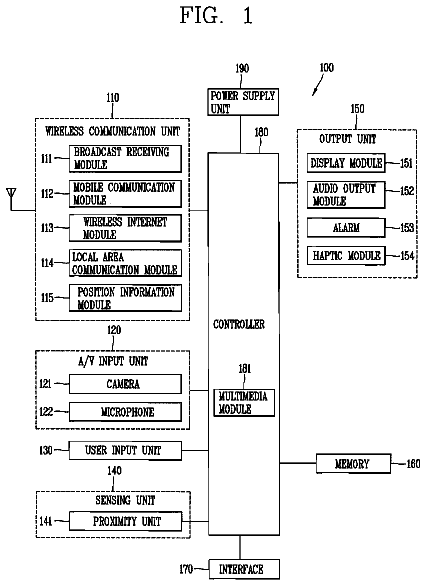
Sheet 1 of 11 from the published document. All sheets in the USPTO PDF
A data processing device is connected to a web data providing unit that provides web data via a network. The web data has at least one of first web data and second web data corresponding to the first web data. A screen reader can be installed on the data processing device. The displaying unit displays the web data. The screen reader voices the first web data displayed on the displaying unit and fails to voice the second web data displayed on the displaying unit. The acquiring unit acquires the web data from the web data providing unit. The determining unit determines, based on visually impaired information indicating that the user is a visually impaired, whether or not the acquiring unit should acquire the first web data from the web data providing unit even if the user instructs the acquiring unit to acquire the second web data from the web data providing unit.
Conventional data processing programs called screen readers function to convert text data displayed on a personal computer (hereinafter abbreviated as "PC") to voice that can be played audibly in order to assist people with visual impairments in using ordinary PCs. One such data processing program designed to support the visually impaired in using a PC is disclosed in Japanese unexamined patent application publication No. 2002-288071. This program provides a display area within the operation screen of a browser that acquires and displays World Wide Web (hereinafter referred to as "Web") data. The display area is used to display menus with links or other data, enabling the visually impaired to acquire Web data through simple operations. When the browser acquires menu data for the visually impaired in addition to the Web data, the program can display this menu data in the operation screen
1 of 11 drawing sheets so far from the published document, cropped to the drawing. Every sheet is in the USPTO PDF.
What the patent claimed, word for word. All of it is now free to use.
This application claims priority from Japanese Patent Application No. 2007-319778 filed Dec. 11, 2007. The entire content of this application is incorporated herein by reference.
The present invention relates to a data processing device and a computer-readable storage medium storing a set of program instructions executable on the data processing device.
Conventional data processing programs called screen readers function to convert text data displayed on a personal computer (hereinafter abbreviated as "PC") to voice that can be played audibly in order to assist people with visual impairments in using ordinary PCs. One such data processing program designed to support the visually impaired in using a PC is disclosed in Japanese unexamined patent application publication No. 2002-288071. This program provides a display area within the operation screen of a browser that acquires and displays World Wide Web (hereinafter referred to as "Web") data. The display area is used to display menus with links or other data, enabling the visually impaired to acquire Web data through simple operations. When the browser acquires menu data for the visually impaired in addition to the Web data, the program can display this menu data in the operation screen of the browser, making the browser more user-friendly to the visually impaired user.
However, in the technology of Japanese unexamined patent application publication No. 2002-288071, when the browser acquires Web data including a video display command to display video that a screen reader would have difficulty voicing, the browser displays this video in the operation screen. However, since the screen reader cannot easily voice this data, a visually impaired user may not be able to understand the voiced content.
In view of the foregoing, it is an object of the present invention to provide a data processing device and a computer-readable storage medium storing a set of program instructions executable on the data processing device capable of acquiring alternate Web data having a greater potential for being voiced when acquiring Web data including a video display command for displaying video that a screen reader would have difficulty voicing, and capable of displaying this Web data in the operation screen.
In order to attain the above and other objects, the present invention provides a data processing device connected to a web data providing unit that provides web data via a network, and on which an OS and a screen reader can be installed. The web data has at least one of first web data and second web data corresponding to the first web data. The data processing device includes a displaying unit, an acquiring unit, a determining unit, and a controlling unit. The displaying unit displays the web data in at least one of a text character form and an image form. The first web data has a voicing part that a user can operate when the first web data is displayed on the displaying unit. The voicing part includes the text character. The screen reader voices the first web data displayed on the displaying unit and fails to voice the second web data displayed on the displaying unit. The acquiring unit acquires the web data from the web data providing unit. The determining unit determine, based on visually impaired information indicating that the user is a visually impaired, whether or not the acquiring unit should acquire the first web data from the web data providing unit even if the user instructs the acquiring unit to acquire the second web data from the web data providing unit. The controlling unit controls the acquiring unit to acquire the first web data when the determining unit determines that the acquiring unit should acquire the first web data, and configured to control the displaying unit to display the first web data.
Another aspect of the present invention provides a computer-readable storage medium storing a set of program instructions executable on a data processing device connected to a web data providing unit that provides web data via a network, and on which an OS and a screen reader can be installed. The web data has at least one of first web data and second web data corresponding to the first web data. The data processing device includes a displaying unit that displays the web data in at least one of a text character form and an image form. The first web data has a voicing part that a user can operate when the first web data is displayed on the displaying unit. The voicing part includes the text character. The screen reader voices the first web data displayed on the displaying unit and fails to voice the second web data displayed on the displaying unit. The program instructions includes a) determining, based on visually impaired information indicating that the user is a visually impaired, whether or not the first web data should be acquired from the web data providing unit even if a user instructs to acquire the second web data from the web data providing unit; b) acquiring the first web data, when it is determined in a) that the first web data should be acquired; and c) controlling the displaying unit to display the first web data, when it is determined in a) that the first web data should be acquired.
The particular features and advantages of the invention as well as other objects will become apparent from the following description taken in connection with the accompanying drawings, in which:
FIG. 1 is a block diagram showing the electrical structure of a PC according to a first embodiment of the present invention;
FIG. 2(a) is an explanatory diagram showing sample content for a Web pagee A including a video display command;
FIG. 2(b) is an explanatory diagram showing sample content for a Web page B including a video display command;
FIG. 2(c) is an explanatory diagram conceptually illustrating the content of a video ID data table;
FIG. 2(d) is an explanatory diagram conceptually illustrating the content of a link ID data table;
FIG. 3 is a flowchart illustrating steps in a main process performed on the PC;
FIG. 4(a) is a screenshot showing an example of a dialog box A;
FIG. 4(b) is a flowchart illustrating steps in a display data toggling process performed on the PC;
FIG. 5 is a flowchart illustrating steps in a link extraction process performed on the PC;
FIG. 6(a) is a block diagram showing the electrical structure of a PC according to a second embodiment of the present invention;
FIG. 6(b) is a flowchart illustrating steps in a main process performed on the PC according to the second embodiment;
FIG. 7(a) is a block diagram showing the electrical structure of a PC according to a third embodiment of the present invention; and
FIG. 7(b) is a flowchart illustrating steps in a main process performed on the PC according to the third embodiment.
Next, preferred embodiments of the present invention will be described while referring to the accompanying drawings.
In a first embodiment of the present invention, a browser application (hereinafter simply referred to as "browser") is installed on a personal computer (hereinafter abbreviated as "PC") 1. When launched, the browser detects whether a screen reader has been installed on the PC 1. If a screen reader is installed on the PC 1 and the browser subsequently acquires a Web page displaying video that the screen reader may have difficulty voicing, the browser acquires an alternate Web page that has greater potential for being voiced and displays the alternate Web page in the operation screen of the browser. The greater potential for being voiced means that a part that a user can operate in the Web page includes a text.
Examples of video that are difficult to voice with a screen reader are Flash (registered trademark) movies, QuickTime (registered trademark) movies, and Java (registered trademark) programs called applets.
Below, the hardware configuration of the PC 1 will be described with reference to FIG. 1, a sample Web page acquired by the browser with reference to FIG. 2, and a main process performed by the browser with reference to FIG. 3.
FIG. 1 is a block diagram showing the electrical structure of the PC 1 on which the browser according to the first embodiment of the present invention is installed, and the electrical structure of a Web server 100. The PC 1 is primarily configured of a CPU 11, a ROM 12, a RAM 13, a hard disk 14, a keyboard 15, a mouse 16, an LCD 17, a speaker 18, and a LAN interface 20, all of which components are interconnected via a bus line 26.
The CPU 11 controls the various functions possessed by the PC 1 and each component connected to the bus line 26 based on fixed values and programs stored on the ROM 12, RAM 13, and hard disk 14 or according to signals exchanged via the LAN interface 20. The ROM 12 is a non-rewritable memory storing control programs and the like executed on the PC 1. The RAM 13 is a rewritable volatile memory used to temporarily store various data when the CPU 11 executes operations on the PC 1.
The RAM 13 is provided with a URL memory area 13a, a Web page memory area 13b, an acquisition restriction flag memory area 13c, a link memory area 13d, and a domain name memory area 13e.
The URL memory area 13a stores a uniform resource locator (URL) for a Web page to be acquired by the browser, as will be described later.
A URL is an identifier used to identify a resource such as a device or data (a Web page, for example) on a network such as an internet 300 and to identify the communication protocol for communicating with or retrieving this resource. More specifically, a URL is configured of a scheme indicating the protocol used in communications or the like, a server name for the Web server 100 storing a Web page, a domain name identifying the network to which the Web server 100 belongs, a folder name on the Web server 100 in which the Web page is stored, and a filename of the Web page.
For example, if the URL is "http://hostname.***.co.jp/path/index.html," then "http://" indicates the protocol used in communications, "hostname" is the server name of the Web server 100 on which the Web page is stored, and "***.co.jp" is the domain name identifying the network to which the Web server 100 belongs. Examples of other possible domain names are "***.com", "***.gr", and "***.gov".
Further, "path" indicates the folder name on the Web server 100 in which the Web page is stored, and "index.html" indicates the filename of the Web page. If the user inputs a URL on the keyboard 15 or specifies a URL with the mouse 16, data for the URL is stored in the URL memory area 13a.
The Web page memory area 13b stores Web pages that the user gave instructions to acquire. A Web page is a text data file published on the Internet or other network and is primarily configured of character encoding conforming to a descriptive language called HyperText Markup Language (HTML). Character encoding is a method of assigning numerical codes to individual characters and symbols to facilitate the handling of characters and symbols on a computer.
HTML is a markup language well known in the art that a Web page designer uses to describe processes to be executed on a browser. HTML has a plurality of commands called "tags" for specifying these processes, with a tag name set for each detail in the process executed on the browser. These tags include a display command for directing the browser to display text in the operation screen in a prescribed color (<font> tag) and video display commands directing the browser to display a video that a screen reader may find difficult to voice. Although this will be described later in greater detail with reference to FIGS. 2(a) and 2(b), video display commands come in the form of <object> tags, <embed> tags, <applet> tags, and the like.
The acquisition restriction flag memory area 13c stores an acquisition restriction flag indicating whether or not a Web server from which a Web page is acquired is restricted. The acquisition restriction flag is set to "on" ("1", for example) when acquisition of a Web page is restricted and "off" ("0", for example) when acquisition of the Web page is not restricted and when the flag is initialized.
More specifically, when the browser has acquired a Web page including a video display command, the browser performs a link extraction process described later with reference to FIG. 5 to extract from the acquired Web page a URL for an alternate Web page having greater potential for being voiced by a screen reader. If the URL for the alternate Web page could not be extracted, the acquisition restriction flag is set to "on."
It is conceivable that Web pages related to the currently acquired Web page and alternate Web pages are stored on a Web server within the same network. Therefore, by restricting acquisition of Web pages to chose from Web servers of a specific domain, it is possible to decrease the likelihood of acquiring Web pages unrelated to the currently acquired Web page or unrelated to an alternate Web page.
Therefore, Web pages can be acquired from only the Web server 100 having the same domain name as that in the URL of the Web page for which a URL for an alternate Web page could not be extracted, while the acquisition restriction flag is set to "on."
The link memory area 13d stores URLs for alternate Web pages when URLs could be extracted in the link extraction process described later.
The domain name memory area 13e stores the domain name in the URL. When the URL for an alternate Web page was extracted in the link extraction process described later, the domain name in the URL stored in the URL memory area 13a is copied to the domain name memory area 13e. When the acquisition restriction flag is set to "on," an alternate Web page can be acquired from only the Web server having the domain name stored in the domain name memory area 13e.
The hard disk 14 is a rewritable, non-volatile memory. Hence, data stored on the hard disk 14 is preserved, even after the power supply to the PC 1 is turned off. The hard disk 14 is provided with an OS memory area 14a, a screen reader memory area 14b, and a browser program memory area 14c.
The OS memory area 14a stores an operating system (OS). The OS is a base program designed to manage components connected to the bus line 26 and is required when the operator uses the PC 1.
The OS is provided with a plurality of setting options related to input operations, as will be described later. By selecting one of the multiple choices provided for each setting, the user can customize the PC 1 for a more pleasant experience.
For example, the user can set the speed of a mouse cursor displayed on the LCD 17 faster or slower than a prescribed default speed (initial value set in the OS) and can set the size of text data displayed on the LCD 17 larger or smaller than a prescribed default text size (initial value set in the OS).
The screen reader memory area 14b stores a screen reader designed to convert text data displayed on the LCD 17 to voice. A screen reader functions to assist a visually impaired user in using the PC 1.
Text data displayed on the LCD 17 can be broadly divided into text data displayed according to character encoding and text data formed as images within an image or video. When a common screen reader is running on the PC 1, the screen reader converts text data displayed according to character encoding into voice signals and outputs voice through the speaker 13.
Since character encoding is formed of numerical values for facilitating the computer in handling characters and symbols, the screen reader can easily recognize the character encoding as text. However, the screen reader has difficulty recognizing text data formed as images in an image or video since the characters are images and, thus, has difficulty voicing this text data. In the preferred embodiment, the screen reader can convert the content of text data based on character encoding displayed in the operation screen of the browser into voice signals and can output the voice from the speaker 18.
The browser program memory area 14c stores a browser that acquires a user specified Web page from the Web server 100 connected to the PC 1 via the internet 300 and displays the content of the Web page in the operation screen.
The browser program memory area 14c stores programs for implementing a main process shown in the flowchart of FIG. 3, a display data toggling process shown in the flowchart of FIG. 4, and a link extraction process shown in the flowchart of FIG. 5.
The browser program memory area 14c is provided with a toggle flag memory area 14c1, a video ID data table memory area 14c2, and a link ID data table memory area 14c3.
The toggle flag memory area 14c1 stores a toggle flag indicating whether to acquire an alternate Web page having greater potential for being voiced when the browser acquires a Web page including video display commands. The toggle flag is set to "on" ("1", for example) when the browser acquires an alternate Web page with greater potential for being voiced and is set to "off" ("0", for example) when an alternate Web page was not acquired and when the flag is initialized.
The video ID data table memory area 14c2 stores video ID data in the form of a keyword. The CPU 11 determines that if the video ID data (keyword) is included in the Web page acquired by the browser, a video display command, that is, video data is included in the acquired Web page. The video ID data will be described later in greater detail with reference to FIG. 2(c).
The link ID data table memory area 14c3 stores link ID data in the form of a keyword. The CPU 11 determines that if the link ID data (keyword) is included in the Web page acquired by the browser, a URL of an alternate Web page having a greater potential for being voiced is included in the acquired Web page. The link ID data will be described later in greater detail with reference to FIG. 2(d).
The keyboard 15 is an input device having a plurality of keys. When the operator presses these keys, input signals corresponding to the pressed keys are inputted into the PC 1. The mouse 16 is a pointing device used to indicate display positions with a mouse cursor displayed on the LCD 17. When the operator moves the position of the mouse cursor with the mouse 16, an input signal corresponding to the amount of movement is inputted into the PC 1 and the display position of the mouse cursor is moved based on the input signal.
The mouse 16 has a mouse button that the user can operate while moving the position of the mouse cursor. When the user operates this button (hereinafter referred to as a "mouse click"), a prescribed input signal is inputted into the PC 1. By operating the keyboard 15 and the mouse 16, the user can modify various settings in the OS and the like and can use the browser and the like.
The LCD 17 functions to display operating procedures and the process status during the execution of operations, as well as data corresponding to keys pressed on the keyboard 15 and operations performed with the mouse 16. The speaker 18 outputs voice signals or the like provided by the screen reader as voice.
The LAN interface 20 is a circuit well known in the art for facilitating data communications with various external devices connected directly to a LAN X 400 and connected to the LAN X 400 via the internet 300 by connecting one end of a LAN cable to a connection port of the LAN interface 20 and the other end to the LAN X 400. Since the PC 1 is connected to the LAN X 400, the PC 1 is identified from the internee 300 side as a device belonging to the LAN X 400 network.
Next, the Web server 100 will be described. The Web server 100 is a device well known in the art for transmitting Web pages to a browser in response to a request from the browser for a Web page stored on the Web server 100.
The Web server 100 is connected to a LAN Y 200 and is capable of performing data communications with various external devices connected directly to the LAN Y 200 and connected to the LAN Y 200 via the internet 300. Since the Web server 100 is connected to the LAN Y 200, the Web server 100 is identified from the internet 300 side as a device belonging to the LAN Y 200 network.
The Web server 100 is provided with a Web page memory area 100a storing a Web pagee A, a Web page memory area 100b storing a Web page B, a Web page memory area 100c storing a Web page C, and a Web page memory area 100d storing a Web page D. The Web pages A and B each includes a video display command. The Web pages C and D serve as an alternate Web pages for the Web pagee A. The Web page C also serves as an alternate Web page for the Web page B. The Web pagee A is associated with URL A; Web page B is associated with URL B; Web page C is associated with URL C; and Web page D is associated with URL D.
Next, examples of Web pages A and B stored in the Web server 100 will be described with reference to FIGS. 2(a) and 2(b). FIG. 2(a) is an explanatory diagram showing sample content of Web pagee A containing a video display command, and FIG. 2(b) is an explanatory diagram showing sample content of Web page B including a different video display command.
As shown in FIGS. 2(a) and 2(b), Web pages A and B are files configured of character encoding based on HTML described above. Since HTML is a markup language well known in the art, the following description will cover only the video display commands and the URL C for the alternate Web page.
As shown in FIG. 2(a), the description for Web pagee A includes an <object> tag, an <embed> tag, a <noembed> tag, and an <a> tag. Of these, the <object> tag and the <embed> tag are video display commands for displaying video in the operation screen of the browser that a screen reader would find difficult to voice.
The <object> tag functions to display content of a file in one of various data formats in the operation screen of the browser. For example, if the <object> tag includes the description <object data="file X" . . . >, the browser acquires file X (a file of an arbitrary data format, such as an image, video, or text file) and displays this content.
The <embed> tag uses a plug-in function embedded in the browser to display content of a file having a data format corresponding to the plug-in function in the operation screen of the browser. For example, if the <embed> tag has the description <embed src="file Y" . . . >, the browser acquires file Y and displays the content of the file using the plug-in function.
The <noembed> tag is a description associated with the <embed> tag and specifies an alternate process for the browser to execute when the browser cannot use the plug-in function specified by the <embed> tag (i.e., cannot display a video that is difficult to voice). The alternate process to be executed by the browser is described between the tags <noembed> and </noembed>. Hence, the description between the tags may include text data to use in place of a video that the screen reader would have difficulty voicing or the URL of a different Web page having text data that can be used in place of the video.
The <a> tag functions to acquire a Web page specified by the user through an instruction (a mouse click, pressed key, or the like) and to display the content of the Web page in the operation screen of the browser. Since the <a> tag associates a Web page displayed in the operation screen with a different Web page, the <a> tag will hereinafter be referred to as a tag specifying a link (separate Web page).
For example, if the <a> tag has the description <a href="URL D"> Site Map </a>, the text data "Site Map" is displayed in the operation screen of the browser. If the user aligns the mouse pointer with the text data "Site Map" and performs a mouse click or selects this text data through key operations and presses the Enter key, the browser acquires the Web page associated with URL D and displays the content of this page in the operation screen. Here, URL D located in the <a> tag will be referred to as the URL specified by the <a> tag.
For example, if the Web page includes the description <noembed> <a href="URL C"> Display Text </a> </noembed>, the browser displays the text data "Display Text" in the operation screen of the browser when unable, to use the plug-in function. In other words, the user can acquire the Web page corresponding to URL C only when the browser cannot use the plug-in function. Therefore, it is highly likely that URL C located within the tags <noembed> and </noembed> indicates an alternate Web page.
Next, Web page B including a different display command from that in Web pagee A will be described.
FIG. 2(b) is an explanatory diagram showing sample content in Web page B, which includes a video display command different from that in Web pagee A. As shown in FIG. 2(b), the description in Web page B includes an <applet> tag and an <a> tag. The <applet> tag is one of the video display commands described above. A description of the <a> tag has already been given above.
The <applet> tag directs the browser to execute a program of a format called a Java (registered trademark) applet. For example, with the description <applet code="file Z" . . . >, the browser acquires and executes file Z (a program created in the Java language). When the browser executes the Java applet, a video, text data, or the like is displayed in the operation screen of the browser, for example.
Hence, when acquiring Web pagee A or Web page B including the video display commands described above, the browser displays a video in the operation screen. However, since screen readers have difficulty voicing videos, a visually impaired user will not be able to recognize the content in the acquired Web page.
Therefore, the browser according to the preferred embodiment extracts a URL from the acquired Web page for an alternate Web page with greater potential for being voiced. The browser acquires the alternate Web page corresponding to this URL and displays the content of the Web page in the operation screen.
In this way, the browser displays text data in the operation screen that the screen reader is more likely able to voice than the video. This is more user-friendly to a visually impaired user since the user can audibly hear and understand the content in the alternate Web page voiced by the screen reader.
Next, a video ID data table stored in the video ID data table memory area 14c2 of the hard disk 14 will be described with reference to FIG. 2(c). FIG. 2(c) is an explanatory diagram showing the structure of the video ID data table.
The video ID data table stores a plurality of video ID data keywords that is used to determine that a video display command is included in Web pages acquired by the browser.
For example, the keywords may be tag names used in HTML for displaying video in the operation screen of the browser. Hence, the video ID data table may store such keywords as "object data," "embed src," and "applet code." Further, the data may be text data or the like directing the user to play a video in the Web page, such as one of the keywords "play video," "play Flash," or "replay."
By allowing the user to edit (add, delete, etc.) video ID data in the video ID data table, the video ID data can be modified to suit Web pages that the user frequently accesses, thereby decreasing the likelihood that an Web page including a video data is acquired. Therefore, the likelihood that a desired alternate Web page can be acquired among a plurality of alternate Web page is increased.
Next, the link ID data stored in the link ID data table memory area 14c3 of the hard disk 14 will be described with reference to FIG. 2(d). FIG. 2(d) is an explanatory diagram showing sample content in the link ID data table.
The link ID data table stores a plurality of link ID data keywords that is used to determine that a URL of an alternate Web page that has a greater potential for being voiced is included in a Web page acquired by the browser.
The link ID data keywords are highly likely to be included between the tags <noembed> and </noembed> or the tags <a> and </a> in the acquired Web page, for example, and suggest that an alternate Web page exists. The example link ID data table shown in FIG. 2(d) includes the keywords "Display Text," "Skip," "Site Map," and "Index Page."
Further, the user may be allowed to edit this link ID data table to add or delete link ID data, for example. Allowing the user to modify link ID data to suit Web pages commonly used by the user increases the likelihood that an alternate Web page can be acquired.
Next, a main process executed by the CPU 11 of the PC 1 will be described with reference to FIG. 3.
FIG. 3 is a flowchart illustrating steps in the main process performed on the PC 1. The main process is performed to acquire an alternate Web page that has a greater potential for being voiced and to display the content of this alternate Web page in the operation screen of the browser when a Web page containing video display commands is acquired while a screen reader is installed on the PC 1. The CPU 11 executes this main process repeatedly while the browser is running.
In S11 of the main process, the CPU 11 initializes the memory areas 13a-13e in the RAM 13. In S12 the CPU 11 determines whether a screen reader is installed on the hard disk 14. For example, the CPU 11 may determine that a screen reader is installed when settings data for an existing screen reader is recorded in the registry, which functions to store settings data for the OS and various programs. As a variation of the process in S12, the CPU 11 may determine that a screen reader is installed on the hard disk 14 when files and folders related to an existing screen reader are stored on the hard disk 14.
If the CPU 11 determines that a screen reader is not installed in the hard disk 14 (S12: NO), the CPU 11 skips S13-S15, and in S16 the CPU 11 sets the toggle flag stored in the toggle flag memory area 14c1 of the hard disk 14 to "off" not to acquire an alternate Web page since the alternate Web page cannot be voiced even if acquired.
However, if the CPU 11 determines a screen reader is installed (S12: YES), in S13 the CPU 11 displays a dialog box A on the LCD 17 prompting the user to confirm whether to display video content if a Web page including a video display command is acquired.
Dialog box A will be described here with reference to FIG. 4(a).
FIG. 4(a) is a screenshot showing an example of dialog box A. Dialog box A is displayed when a Web page including a video display command was acquired. When dialog box A is displayed, the user can input an instruction to acquire an alternate Web page or to display video content according to the acquired Web page without acquiring an alternate Web page.
Dialog box A is provided with a text box TB61 and buttons BT71 and BT72. The text box TB61 is a display region displaying a message to the user configured of text data, such as "In current setting, an alternate Web page suitable for screen readers is acquired and displayed when a Web page includes Flash or other video data. Would you like to modify this setting so that the acquired Web pages are displayed as is? (Note: this message cannot be read with voicing software, an operation cannot be performed for this message, with the keyboard.)"
The button BT71 enables the user to input an instruction for displaying video content according to the acquired Web page, without acquiring an alternate Web page. A button name "Yes" is assigned to the button BT71 and displayed therein. Specifically, when the button BT71 is selected, the toggle flag stored in the toggle flag memory area 14c1 of the hard disk 14 is set to "off."
The button BT72 allows the user to input an instruction to preserve the current setting for acquiring an alternate Web page. A button name "No" is assigned to the button BT72 and displayed therein. When the button BT72 is selected, the toggle flag is set to "on" and alternate Web pages are acquired. Dialog box A closes when one of the buttons BT71 and BT72 is pressed.
The text data displayed in the text box TB61 and the button names displayed in the buttons BT71 and BT72 are configured of images that cannot be voiced with a screen reader. Therefore, it is unlikely that a visually impaired user will modify the setting to display video content and, hence there is less likelihood that the setting will be modified to display video content when a visually impaired user is operating the PC 1.
This setting is changed to display video content in the operation screen of the browser when the user inputs such an instruction in dialog box A by selecting the button BT71. Hence, if the user of the PC 1 is sighted, the user can display video content by performing prescribed input operations when the option is set to acquire an alternate Web page, making this configuration convenient for sighted users.
Further, dialog box A is configured to receive input operations only through the mouse 16, and the option for displaying video content is set only when the button BT71 is pressed with the mouse 16. Since it is difficult for a visually impaired user to perform input operations using the mouse 16, it is unlikely that such a user will select the button BT71 to switch the option to the setting for displaying video content. Accordingly, when a visually impaired user is operating the PC 1, there is less likelihood that the option will be modified to display video content.
Returning to the flowchart in FIG. 3, after completing the process in S13, the CPU 11 determines in S14 whether the user pressed the Yes button BT71 in dialog box A displayed on the LCD 17. If the user pressed the Yes button BT71 (S14: YES), in S16 the CPU 11 sets the toggle flag stored in the toggle flag memory area 14c1 of the hard disk 14 to "off" not to acquire an alternate Web page.
However, if the No button BT72 was pressed in dialog box A (S14: NO), in S15 the CPU 11 sets the toggle flag to "on" to acquire an alternate Web page. As a variation to the process in S14, the CPU 11 may determine that the No button BT72 was pressed if an input operation is not performed on the buttons BT71 and BT72 within a prescribed time (one minute, for example) after dialog box A was displayed on the LCD 17 in S13.
In S17 the CPU 11 determines whether the user issued an instruction to acquire a Web page. The user issues such an instruction by inputting a URL on the keyboard 15 or specifying a URL with the mouse 16. While no instruction to acquire a Web page has been issued (S17: NO), the CPU 11 waits until an instruction is given.
When the CPU 11 determines that the user has issued an instruction to acquire a Web page (S17: YES), in S18 the CPU 11 determines that the URL of the Web page instructed in S17 is identical with the URL stored in the URL memory area 13a. When the identical URL is stored in the URL memory area 13a (S18: YES), in S19 the CPU 11 stores the inputted or indicated URL in the URL memory area 13a of the RAM 13. In the first time of this process, the process advances to S19 since a URL is not stored in the URL memory area 13a.
When the identical URL is not stored in the URL memory area 13a (S18: NO), in S20 the CPU 11 sets the acquisition restriction flag in the acquisition restriction flag memory area 13c to "off" so that the CPU 11 can acquire the instructed URL. In S21 the CPU 11 determines whether the acquisition restriction flag stored in the acquisition restriction flag memory area 13c is set to "on."
If the acquisition restriction flag is "on" (S21: YES), in S22 the CPU 11 determines whether the domain name in the URL stored in the URL memory area 13a matches the domain name stored in the domain name memory area 13e since an alternate Web page can be acquired from only the Web server having the domain name stored in the domain name memory area 13e.
If the domain name of the URL stored in the URL memory area 13a differs from the domain name in the domain name memory area 13e (S22: NO), the CPU 11 cannot acquire a Web page corresponding to the URL stored in the URL memory area 13a. Therefore, the CPU 11 returns to S17 and waits until a next instruction is given.
However, when the domain name in the URL stored in the URL memory area 13a matches the domain name in the domain name memory area 13e (S22: YES), in S23 the CPU 11 acquires a Web page corresponding to the URL stored in the URL memory area 13a and stores this Web page in the Web page memory area 13b.
On the other hand, if the acquisition restriction flag is "off" (S21: NO), the CPU 11 skips S22 and advances to S23 to acquire a Web page corresponding to the URL stored in the URL memory area 13a and stores this Web page in the Web page memory area 13b.
In S24 the CPU 11 determines whether the toggle flag stored in the toggle flag memory area 14c1 is set to "on." If the toggle flag is on (S24: YES), in S25 the CPU 11 executes the display data toggling process described later since it is allowed to acquire an alternate Web page. The display data toggling process is performed to switch the Web page displayed in the operation screen of the browser based on whether the Web page acquired in S23 includes video ID data indicating that the web page includes a video display command.
Then, in S27 the CPU 11 determines whether the user has indicated an instruction to quit the browser. If a quit instruction has been inputted (S27: YES), the CPU 11 ends the main process. However, if a quit instruction has not been inputted (S27: NO), the CPU 11 returns to S17 and waits until a next instruction is given.
If the CPU 11 determines that the toggle flag is off (S24: NO), in S26 the CPU 11 displays, without change, text data, still images, video, and the like in the operation screen of the browser according to the Web page stored in the Web page memory area 13b since it is not allowed to acquire an alternate Web page. Then, the CPU 11 advances to S27 described above.
Through the main process described in FIG. 3, the CPU 11 acquires an alternate Web page having a greater potential for being voiced and displays the content of this Web page in the operation screen of the browser under the condition that a Web page containing a video display command is acquired while a screen reader is installed on the PC 1.
Since a screen reader is a program for aiding visually impaired users in using a PC, there is a good chance that a visually impaired user is using the PC when a screen reader is installed thereon. Accordingly, the CPU 11 acquires an alternate Web page that has a greater potential for being read by a screen reader and displays the content of the page in the operation screen of the browser under the condition that a Web page including video display commands has been acquired for a PC that is likely used by a visually impaired user.
As a result, the screen reader has a greater potential for voicing the data displayed in the operation screen of the browser than when the Web page with video content is displayed in the operation screen. This is very convenient for a visually impaired user since the user can audibly hear and understand the content when the data displayed in the operation screen of the browser is voiced.
On the other hand, if a screen reader is not installed on the PC 1, i.e., when a sighted user is operating the PC 1, the video content is displayed in the operation screen of the browser, thus being more convenient for the sighted user.
Next, the display data toggling process (S25 of FIG. 3) executed by the CPU 11 of the PC 1 will be described with reference to FIG. 4(b).
The description continues in the full USPTO document.
About 7,116 words. The USPTO PDF has it with every drawing.
Fees are due 3.5, 7.5 and 11.5 years after grant. This patent expired on April 22, 2026, so the fee marked "not paid" was the one that went unpaid.
DATA PROCESSING DEVICE
Filed Dec 2008 · published Jun 2009Detection of a user's visual impairment based on user inputs or device settings, and presentation of a website-related data for sighted or visually-impaired users based on those inputs or settings
Filed Dec 2008 · granted Apr 2014Earlier publications, parents and continuations. None of them can still be enforced, or this patent would not be listed.
Prior art cited by the examiner or applicant. Useful when you check your own idea for novelty.
Everything on this page comes from the documents linked above.


