 Lapsed, fee not paid6 drawings
Software & Apps · US 8,552,743 B2
Microwave diffraction system
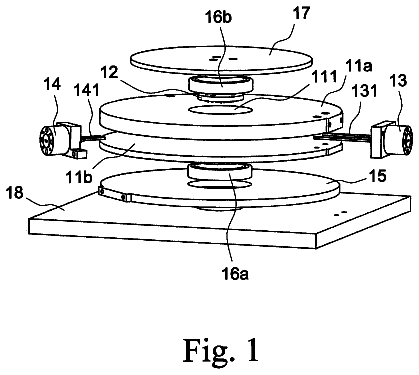
A microwave diffraction system includes two plates, a lattice model, a transmitter and a detector.
US 8,552,984 B2 · Assignee: 602531 British Columbia Ltd. · Inventors: Knaven; Peter
Sheet 1 of 21 from the published document. All sheets in the USPTO PDF
In one aspect of the present invention a computer-implemented method is provided of processing input key events associated with user input received from a keyboard-type device, wherein the keyboard-type device selected from at least one of a keyboard and a keypad. In this aspect, input key events associated with a first process active within an operating system are received and monitored for a first predefined input key event associated with user selection of a first key of the keyboard-type device for at least a predetermined time period. In response to identifying the first predefined input key event, the input key events are redirected from the first process to a second process. The input key events are monitored for a second predefined input key event associated with further redirection of the input key events. In response to identifying the second predefined input key event, the input key events are redirected to the first process.
1 of 21 drawing sheets so far from the published document, cropped to the drawing. Every sheet is in the USPTO PDF.
What the patent claimed, word for word. All of it is now free to use.
Independent claims stand on their own. The others add detail to the claim they name.
The present invention relates to a method, system, apparatus and computer-readable media for directing input associated with a keyboard-type device.
In one aspect of the present invention, there is provided a computer-implemented method of processing input key events associated with user input received from a keyboard-type device, the keyboard-type device selected from at least one of a keyboard and a keypad. In this aspect, the method comprises: (a) receiving input key events associated with a first process active within an operating system; (b) monitoring the input key events for a first predefined input key event associated with user selection of a first key of the keyboard-type device for at least a predetermined time period; (c) in response to identifying the first predefined input key event, redirecting the input key events from the first process to a second process; (d) monitoring the input key events for a second predefined input key event associated with further redirection of the input key events; and (e) in response to identifying the second predefined input key event, redirecting the input key events to another process.
Many variations of this method are contemplated, as described further in this specification. There is also provided a computer-readable medium having stored instructions for use in execution of the aforementioned method and its variations.
In another aspect of the present invention, there is provided a system for processing input key events associated with user input received from a keyboard-type device, the keyboard-type device selected from at least one of a keyboard and a keypad. In one arrangement, the system comprises: (a) means for receiving input key events associated with a first process active within an operating system; (b) means for monitoring the input key events for a first predefined input key event associated with user selection of a first key of the keyboard-type device for at least a predetermined time period; (c) means for redirecting the input key events from the first process to a second process in response to identifying the first predefined input key event; (d) means for monitoring the input key events for a second predefined input key event associated with further redirection of the input key events; and (e) means for redirecting the input key events to another process in response to identifying the second predefined input key event.
In yet another aspect of the present invention, there is provided a keyboard-type device comprising: (a) a plurality of user input signal generators for producing first input signals in response to user actuation thereof; (b) a display device; (c) a processor circuit in communication with said display device and said user input signal generators, said processor circuit configured to: (i) generate a plurality of predictive text completion candidates in response to said first input signals and display said plurality of predictive text completion candidates on said display device; and (ii) communicate at least one of said predictive text completion candidates to a personal computing device remote from the keyboard-type device in response to user selection of the at least one of said predictive text completion candidates.
Several other aspects and features of the present invention will become apparent to those ordinarily skilled in the art upon review of the following description of specific embodiments of the invention in conjunction with the accompanying drawings.
In the accompanying drawings which illustrate embodiments of the invention,
FIG. 1 is a block diagram of an input management system in use in association with a first process and a second process, according to a first embodiment of the invention;
FIG. 2 is a block diagram of a personal computing device loaded with a data entry system, according to a first embodiment of the invention;
FIGS. 3 and 4 are flow diagrams illustrating the operation of an input management system in accordance with the first embodiment of the present invention;
FIG. 5 is a block diagram of a data structure for a keyboard message used in connection with the first embodiment;
FIG. 6 is a block diagram illustrating operation of a keyboard when keyboard input is redirected to a second process, according to the first embodiment of the invention;
FIG. 7 is a block diagram illustrating another form of operation of a keyboard when keyboard input is redirected to a second process, according to the first embodiment of the invention;
FIG. 8 is a block diagram of an input management system in use in association with a first process and a second process, according to another embodiment of the invention;
FIGS. 9 and 10 are flow diagrams illustrating the operation of an input management system in accordance with the embodiment of the present invention shown in FIG. 8;
FIG. 11 is a block diagram illustrating an arrangement of registered expander processes, in accordance with the embodiment of the present invention shown in FIG. 8;
FIG. 12 is a block diagram illustrating yet another embodiment of the invention;
FIGS. 13 and 14 are flow diagrams illustrating the operation of an input management system and an input management director in accordance with another embodiment of the present invention;
FIG. 15 is a flow diagram illustrating the operation of another variation of an input management director in accordance with another embodiment of the present invention;
FIGS. 16 to 20 are diagrams illustrating yet further aspects and variations in accordance with the present invention; and
FIGS. 21 to 25 are diagrams illustrating further aspects and variations associated with an enhanced keyboard-type device, in accordance with the present invention.
Reference will now be made in detail to implementations and embodiments of the invention, examples of which are illustrated in the accompanying drawings.
Introduction
Referring to FIGS. 1 and 2, in accordance with a first embodiment a computer-implemented input management system 20 is configured to process input key events associated with user input received by a personal computing device 10 from a keyboard-type device 14. In the first embodiment, for illustration purposes, the personal computing device 10 is a laptop and the keyboard-type device 14 is a keyboard 14.1 (for example, a QWERTY-type keyboard). As discussed further below, however, many various types of personal computing devices and keyboard-type devices (including keyboards and keypads) can be used in connection with the present invention and the components described in the first embodiment are meant to be illustrative only.
The input management system 20 operates in association with a computer-implemented operating system 22, which for the purposes of the first embodiment is Windows XP.TM.. Both the input management system 20 and the operating system 22 are stored on and run on the personal computing device 10 in the first embodiment. In other embodiments, the personal computing device may be operative over a computer network with some or all of the operating system 22 located on a host computer server or other remote computing device. Similarly, the input management system 20 may be located on a remote computer server or other remote computing device and accessed remotely by a terminal-type unit or by another form of personal computing device (including personal computing device 10).
The input management system 20 is configured to monitor a user input stream 24 associated with a first process 30 active within the operating system 22. The user input stream 24 comprises codes representing input key events associated with user operation of the keyboard-type device 14. As the user operates the keyboard-type device 14, selecting and deselecting keys, the codes are received by the personal computing device 10 and identified as input key events by the operating system 22.
The input management system 20 monitors the user input stream 24 for an occurrence of a first predefined input key event associated with user selection of a first key of the keyboard-type device 14 for at least a predetermined time period T.sub.1. In the first embodiment, the input management system 20 comprises a monitoring module 28 configured to perform the monitoring of the user input stream 24. In response to identifying the occurrence of the first predefined input key event, the input management system 20 is configured to redirect the user input stream 24 from the first process 30 to a second process 34.
For the purposes of this specification, the term "process" means a computer-implemented process for completing a set of computer-implemented instructions in order to provide predetermined functionality to a user and which is receptive to user input. Such a process can be a computer program, including a software application, applet or the like, and can be either an independent program or it may be a program that provides certain functionality to a larger program.
Windows Applications
In the first embodiment, processes are represented by windows applications which are displayed on a graphical user interface. For illustration purposes, the first process 30 is a word processor application, more particularly Microsoft.TM. Word.TM., and the second process 34 is a predictive text entry system 34.1. In the illustrated embodiment, the predictive text entry system 34.1 is an application configured to predict and retrieve predictive text completion candidates (or completion candidates) from a dictionary by determining which predictive text completion candidates in the dictionary are more likely to be the ones that the user is attempting to type based on the characters in the partial text entry generated by the user, as illustrated in co-owned U.S. patent application Ser. No. 10/399,560 (corresponding to PCT/CA01/01473, International Publication No. WO 02/33527 A2). Various forms of the predictive text entry system 34.1 may be used as illustrated in PCT/CA01/01473. Preferably, potential completion candidates retrieved by the predictive text entry system 34.1 are displayed in a searchable list and may be selected using the keyboard or a mouse or a combination of both the keyboard and the mouse. Other types of predictive text entry systems may be used in the present case. By way of example, other predictive text entry systems are illustrated in co-owned U.S. patent application Ser. No. 09/272,700 (PCT/CA00/000285, International Publication No. WO 00/57265).
As indicated above, the use of the word processor application as the first process 30 and the predictive text entry system 34.1 as the second process 34 are for illustration purposes. It will be appreciated that many other end-user processes may be used in substitution of a word processor and the predictive text entry system 34.1. By way of example, the first process 30 can, in the alternative, be a spreadsheet, a browser, a database interface, an enterprise resource planning system, or some other form of process providing functionality to a user and receptive to user input in association with a keyboard-type device. In addition or in the alternative, the second process 34 can be another form of predictive text entry system or some other process configured to provide additional functionality to the user in association with the first process 30 or to another process operative in connection with the second process 34 in response to redirection of the user input stream 24.
Redirecting the user input stream 24 to the second process 34 in response to the first predefined input key event for at least the predetermined time period T.sub.1 enables the input management system 20 to provide an adaptive interface for enhancing the functionality of the first process 30 with functionality provided by the second process 34. Alternatively, the redirection mechanism provided by the input management system 20 can be used to invoke one or more other processes to enhance the functionality of the first process 30 or another process available on or through the personal computing device 10. The redirection mechanism of the input management system 20 is described in further detail below.
In the first embodiment, once the user input stream 24 has been redirected to the second process 34, the input management system 20 monitors the user input stream 24 for an occurrence of a second predefined input key event associated with further redirecting the user input stream 24. In response to identifying the occurrence of the second predefined input key event, the input management system 20 redirects the user input stream 24 to either the first process 30 or another process. In the case of the first embodiment, the input management system 20 redirects the user input stream 24 back to the first process 30.
Input Key Events and Keyboard-Type Input
Input key events associated with user operation of the keyboard-type device 14 are communicated to the applicable process via the operating system 22. An input key event represents an event associated with a particular key or set of keys supported by the keyboard-type device 14. In general, an input key event is associated with user selection or deselection of a key or set of keys available the keyboard-type device 14. For example, selection of a particular key on the keyboard-type device 14 represents one input key event, and deselection of the selected key represents another input key event. Selection of a particular key for at least predefined period of time T.sub.1 represents another input key event associated with user operation of the keyboard-type device 14. Input key events are used by the input management system 20 to manage the direction of the user input stream 24 and to determine which process or set of processes will receive the user input stream 24 in response to or during a particular input key event or set of input key events.
As mentioned earlier, in the first embodiment the keyboard-type device 14 is preferably a keyboard 14.1. In this case, keyboard input is received from the keyboard 14.1 by the personal computing device 10 in the form of input key events (in this embodiment, also referred to as keyboard events) which are processed by the operating system 22. Preferably, keyboard input is received by the operating system 22 via a keyboard device driver that receives scan codes from the keyboard 14.1. The scan codes represent identifiers associated with the respective keys on the keyboard 14.1. Each key on the keyboard 14.1 preferably has a unique scan code value associated with it. The mechanism by which scan codes are implemented can be device dependent and therefore the keyboard device driver applicable to the keyboard 14.1 device in use provides a mechanism for receiving scan codes from the applicable keyboard 14.1 and for having the scan codes translated into virtual key codes recognizable by the operating system 22. Keyboard device drivers and their use in connection with keyboard devices are well known in the art.
In the first embodiment, where the operating system 22 is Windows XP.TM., the keyboard device driver interprets a scan code and translates it into a virtual key code which is a device independent value defined by the operating system 22 that identifies the purpose of a key. The keyboard 14.1 generates two scan codes when a user selects a key on the keyboard 14.1. One scan code is generated when the user selects the key and another is generated when the user deselects the key.
System Level Focus for Keyboard Input
Keyboard input received from the keyboard 14.1 is communicated via the operating system 22 to the process that has the keyboard focus. The keyboard focus is used as a mechanism for determining which process is currently assigned to receive keyboard input. The keyboard focus can be set to a particular process using the commands available with the applicable operating system 22. For example, with Windows XP.TM. the keyboard focus can be given to one of the applications (or windows) preferably by calling the SetFocus function and the AttachThreadInput function available with the Windows XP.TM. operating system. With Windows XP.TM. a window can be made active and brought to the foreground in the graphical user interface by setting the window using the SetActiveWindow and SetForegroundWindow functions provided by Windows XP.TM.. In the first embodiment, keyboard input received from the keyboard 14.1 is translated by the operating system 22 and posted as a keyboard message to a message queue of the thread that created the window with the keyboard focus. Eventually, the keyboard message is removed from the message queue and passed to the appropriate window procedure of the window with the keyboard focus. This form of keyboard focus is well known in the art and is referred to in this specification as operating system-level keyboard focus. More generally, the term "system-level input focus" is used in this specification to refer to the assignment of input received from a keyboard-type device to a process through functionality provided by the operating system (such as through a programmable interface or API available with the operating system). System-level input focus includes the operating system-level keyboard focus described above.
In the first embodiment, the operating system 22 shares the keyboard 14.1 among the various processes running within the operating system 22 (where these processes are represented in the first embodiment as windows applications running within Windows XP.TM.), by shifting the keyboard focus from one window (process) to another window (process) at the user's direction. The window that has the keyboard focus receives the keyboard messages from the user input stream 24 until the keyboard focus changes to a different window. The keyboard focus can be shifted from one window (process) to another window (process) through a variety of activities including, but not limited to, the user opening a new application using the keyboard 14.1, a mouse or another human input device; by the user shifting keyboard focus from one window to another window that does not currently have keyboard focus (for example by switching windows by using the mouse to click on a window that does not currently have keyboard focus), or by some other action of the user that the operating system 22 is configured to recognize as a shift in keyboard focus from one window (process) to another window (process) running on the operating system 22. Other examples of a user switching windows would be by a user selecting a window that does not have system focus by using the ALT and TAB key or ALT and ESC key, or by selecting it from the task bar in Windows XP.TM..
In the absence of the input management system 20, keyboard input, once translated by the applicable keyboard device driver, would be placed in an applicable message queue for receipt by the application in the window that currently has the keyboard focus. As illustrated in FIG. 1, the input management system 20 interposes itself between the translated keyboard input and the process(es) which may receive the translated keyboard input. By interposing itself in this way, the input management system 20 can be used to redirect keyboard input received in the user input stream 24 to one or more other processes that provide enhanced functionality (expander processes) in association with the process that previously had keyboard focus before redirection occurred.
Logical Focus
As discussed above, keyboard input can be directed to a particular process using the system-level input focus provided by the operating system 22. This is one approach to control the flow of the user input stream 24 for some embodiments, if the operating system 22 and the associated personal computing device operate fast enough to handle a rapid stream of input from the keyboard-type device. However, managing redirection of the user input stream 24 solely through the assignment of system-level input focus can present certain challenges. For example, from the perspective of the input management system 20, with certain Windows.TM. applications such as the Internet Explorer.TM. browser or the Excel.TM. spreadsheet, one cannot reliably maintain the same state of the original application when switching input focus at the operating system level back to the original application following a redirection. As well, with certain operating systems such as Windows.TM., certain applications, such as the MS-DOS.TM. command window, will not automatically give up system-level input focus.
In the first embodiment, a timer mechanism is preferably implemented to provide another layer of keyboard focus. In this way, with the introduction of the input management system 20, at least two levels of keyboard focus are supported: the keyboard focus provided at the operating system level (earlier referred to more generally as the system-level input focus), and a logical keyboard focus supported by the input management system 20. For the purposes of this specification, "logical keyboard focus" refers to an assignment of keyboard input to a process while another process continues to be assigned operating system-level keyboard focus. More generally, in this specification the term "logical input focus" refers to an assignment of input from a keyboard-type device to a process while another process continues to be assigned system-level input focus. Thus, in the first embodiment, through the use of logical keyboard focus, the input management system 20 is configured to support the redirection of keyboard input from one process to another process even though the first process continues to be assigned keyboard focus at the operating system level. In this way, keyboard input from the keyboard 14.1 can be directed towards the appropriate process based on the context in which the keyboard input is being received even though another process has been assigned keyboard focus at the operating system level and would be therefore entitled to otherwise receive the keyboard input. Enabling the redirection of keyboard input to be independent of which process has keyboard focus at the operating system level provides a significant advantage in that it allows the input management system 20 to support redirection of the keyboard input to one or more processes independent of limitations imposed by the operating system 22 on keyboard focus at the operating system level. Moreover, this approach provides improved consistency in how input from the keyboard 14.1 (more generally, from a keyboard-type device) is received by applications in the presence of one or more processes that provide expanded functionality for one or more of the other processes resident in the operating system 22.
Operating Environment
The personal computing device 10 in the first embodiment is a laptop computer having a graphical display device comprising a liquid crystal display.
FIG. 2 shows, for illustration purposes, a block diagram of personal computing device 10 according to the first embodiment. As shown in FIG. 2, the personal computing device 10 comprises a processing unit 12 (for example, a CPU) connected via bus 11 to a computer-readable medium 16. The computer-readable medium 16 provides a memory store for computer programs and data residing in the personal computing device 10, including, in the first embodiment, the input management system 20, the operating system 22, the first process 30, represented by the word processor Microsoft.TM. Word.TM., and the second process 34, represented by the predictive text entry system 34.1. The computer-readable medium 16 can include one or more types of computer-readable media including volatile memory such as Random Access Memory (RAM), and non-volatile memory, such as a hard disk or Read Only Memory (ROM). In the first embodiment, the computer-readable medium available on the personal computing device 10 comprises RAM, ROM and a hard disk drive. Other types of user programs can also be stored in the personal computing device 10 and used in connection with the input management system 20 such as a browser or micro-browser, a spreadsheet, an email application or another user application.
The keyboard-type device 14 provides a mechanism for providing user input to programs running on the personal computing device 10. As discussed earlier, user input is received from the keyboard-type device 14 in the form of codes received in user input stream 24 and which represent input key events associated with user operation of the keyboard-type device 12. As indicated above, in the first embodiment the keyboard-type device 14 is a QWERTY-type keyboard. However, the keyboard-type device 14 can be a keyboard, a keypad or both a keyboard and a keypad, and the actual configuration of a keyboard or keypad can vary (such as, by way of example, keyboard configurations from Logitech.TM., keyboard configurations from Dell Corporation, the Half Keyboard.TM. by Matias Corporation, and the Dvorak keyboard layout). In addition, various types of keyboards and keypads may be used in connection with the input management system, including, but not limited to, physical keyboards and keypads, and virtual keyboards and virtual keypads (also referred to as soft keyboards and soft keypads). Physical keyboards and keypads may be wired, wireless or encased within (or forming part of) the personal computing device (such as with many laptops and hand held devices). With virtual keyboards and keypads, a visual representation of the keyboard or keypad (as the case may be) is displayed using a display device such as a computer monitor, LCD screen, touch sensitive screen, digital projector or some other display device for displaying images generated by a computing device. In certain cases with virtual keyboards and keypads, the display device also serves as a physical input interface for the user, such as with touch-sensitive screens. Moreover, in another aspect, keys formed on a physical keyboard-type device or displayed on a virtual keyboard-type device can be more generally referred to as a plurality of user input signal generators. In certain circumstances the plurality of user input signal generators comprise a plurality of physical keys. In other circumstances, the plurality of user input signal generators comprise a plurality of virtual keys. Virtual keys can be displayed on a display device or projected onto a display area (such as with holographic keyboards or keypads).
It will also be appreciated that while in the first embodiment the personal computing device 10 is a laptop, the aspects and features of the present invention may be practiced with a wide range of personal computing devices including personal computers, workstations, laptops, hand held computing devices including personal digital assistants and tablet PCs, computer terminal units and the like, and other electronic devices including mobile phones, Internet appliances (including home and office computers and TVs connected to the Internet), and embedded devices (including home and office devices), provided the aforementioned personal computing devices have or are operative with, directly or indirectly, a suitable graphical display device and a virtual or physical keyboard-type device receptive to user operation. Other types of equivalent personal computing devices to which the features and aspects of the present invention are applicable include, by way of example, an Internet appliance controlled via a virtual or physical keyboard-type device (for instance, running an Internet application though a television or other display device in association with a wireless keyboard).
With respect to the computer-readable medium 16 described above, it will be appreciated that software entities (for example, input management system 20 and second process 34) can be stored as computer-readable instructions on one or more types of computer-readable media including smart media, flash memory, a memory key such as a USB memory key, a hard disk drive, a network drive, a micro-drive, CD-ROM, CD-R, CD-RW, DVD (+/-R, +/-RW), optical disk, mini-disk, floppy disk, a ZIP disk, or some other computer-readable media, provided the computer-readable media is capable of storing computer-readable instructions and can operate as part of or in communication with the personal computing device 10.
For the purposes of the first embodiment, the operating system 22 installed on the personal computing device 10 is Windows XP.TM.. However, the operating system 22 can be any operating system suitable for supporting the operation of the input management system 20 in connection with the applicable personal computing device. For example, for hand-held devices the operating system 22 can be an operating system suitable for the applicable hand-held device, such as, by way of example, Windows CE.TM., PocketPC.TM., EPOC.TM., PalmOS.TM., or an equivalent operating system. For larger personal computing devices, such as workstations, laptops or desktop computers, an operating system suitable for the applicable personal computing device may be used, such as, by way of example, Windows.TM. (including Windows XP.TM., Windows 2000.TM. or the like), MacOS.TM., UNIX.TM., Linux.TM., or the like.
System Flow
Referring to FIGS. 3 and 4, logical flow diagrams illustrate the operation of the input management system 20 shown in FIGS. 1 and 2.
In the discussion that follows, the word processor representing the first process 30 initially has system-level input focus and is therefore designated, in so far as the operating system 22 is concerned, to receive keyboard input. Redirection of keyboard input from the first process 30 to the second process 34 and back is handled by the input management system 20 based on the keyboard input received from the keyboard 14.1 and the state of the keyboard input when it is received.
In the first embodiment, when the predictive text entry system 34.1 (or more generally, the second process 34) is initially launched, the predictive text entry system 34.1 initializes the input management system 20. As part of this initialization, the input management system 20 calls functionality supplied by the operating system 22 so as to make the input management system 20 available to the operating system 22. For the first embodiment, where Windows XP.TM. is used, the Windows.TM. SetWindowsHookEx function is called so as to make the input management system 20 available to the operating system 22. In addition, the predictive text entry system 34.1 starts a system focus recorder 34.2 which is configured to monitor the system-level input focus associated with the operating system 22 on a reoccurring basis. The system focus recorder 34.2 starts a reoccurring timer loop which records the system-level input focus on a reoccurring basis every N number of milliseconds (where N represents a predetermined number of milliseconds, for example, 20 milliseconds). In the first embodiment, the system focus recorder 34.2 obtains the system-level input focus by invoking the GetFocus function provided by Windows XP.TM.. With Windows XP.TM., system-level input focus is assigned to a particular window (for example, the first process 30 in the example shown in FIG. 1), and each window has a window handle associated with it. In recording the system-level input focus, the system focus recorder 34.2 keeps track of the current window handle of the window with system-level input focus (other than the window associated with the process in which the system focus recorder 34.2 resides). Thus, when invoked, the GetFocus function returns the window handle for the window that has system-level input focus. The predictive text entry system 34.1 (or more generally, the second process 34) uses this window handle to communicate with the process with system-level input focus, which in the first embodiment is the first process 30.
The input management system 20 monitors user input stream 24 for keyboard input received by the personal computing device 10 from the keyboard 14.1. In the first embodiment, the keyboard input is received by the personal computing device 10 in the form of scan codes associated with the applicable key on the keyboard 14.1, which the user has selected and then deselected. As indicated earlier, in response to the selection of a key on the keyboard 14.1, a particular scan code is generated by the keyboard 14.1, which is translated by the operating system 22 into a virtual key code for use by one or more processes using the operating system 22.
In response to receiving a virtual key code, the input management system 20 checks at block 100 to see if a request for keyboard input redirection has been previously received by the input management system 20 from another process. More generally, block 100 involves evaluating whether the occurrence of a first predefined input key event has taken place.
In the first embodiment, from the user's perspective, a redirection request occurs when the user selects an alphanumeric key on keyboard 14.1 for a sufficient period of time to cause a redirection timer to reach the predetermined time period T.sub.1. From the perspective of the programming logic in the first embodiment, requests for the redirection of keyboard input are made to the input management system 20 by an input management director 34.3 embedded in the predictive text entry system 34.1. The input management director 34.3 is configured to identify when a redirection event has occurred and to set a redirection flag in the input management system 20 when the redirection event is identified. The input management director 34.3 is also operative to pass keyboard input received from the input management system 20 on to the predictive text entry system 34.1 for further processing. The operation of the input management director 34.3, including when it passes keyboard input on to the predictive text entry system 34.1 is discussed further below.
The processing at block 100 involves checking to see whether the redirection flag in the input management system 20 has been set (e.g. if the redirection flag has been set to "ON" or "ACTIVE"). In the first embodiment, a redirection timer associated with the redirection flag is used by the input management director 34.3 to set the redirection flag. When the redirection timer fires, the input management director 34.3 is configured to set the redirection flag so that it is "ON". The redirection timer fires when it has reached the predetermined time period T.sub.1. Preferably, the redirection flag takes the form of a coding variable in the input management system 20. The setting and resetting of the redirection flag is discussed in further detail below.
If the input management system 20 determines at block 100 that it has previously received a redirection request for keyboard input from another process (in this case, the input management director 34.3), then processing proceeds to block 102 where the virtual key code and the related information regarding the state of the associated key are sent as a registered message (more generally, a keyboard message) to the input management director 34.3 for further processing (discussed in further detail below in the context of FIG. 4). The registered message sent at block 102 to the input management director 34.3 comprises
the virtual key code for the key currently selected on the keyboard 14.1 (the selected key),
the scan code associated with the selected key and received from the keyboard 14.1, and
the Key_Down indication (in the form of a Key_Down flag) associated with the selected key. For illustration purposes, a data structure 50 representing the registered message sent to the input management director 34.3 is shown in FIG. 5. Note that the use of registered messages, above and in what follows, is a feature of Windows XP.TM. in the first embodiment. Registered messages are sent from one process to another process in the first embodiment using the PostMessage function provided by Windows XP.TM.. More generally, keyboard messages that are not "registered messages" (such as is used by Windows XP) may be used in operating systems that do not require the use of registered messages. Furthermore, in other operating systems, other mechanisms supported by those operating systems can be used, such as shared memory.
Once the input management system 20 sends the registered message at block 102 to the input management director 34.3, the input management system 20 waits to receive further keyboard input.
If the input management system 20 determines at block 100 that it is not in a state where it has been configured to initiate redirection of keyboard input to the input management director 34.3, then processing proceeds to block 104. At block 104 the input management system 20 evaluates whether the keyboard input currently received has a repetition indication associated with it. The keyboard input currently received will have a repetition indication associated with it if the key associated with such keyboard input has been selected for a period of time sufficient to active the automated repeat feature of the keyboard device driver. If the answer to the evaluation at block 104 is "NO", then processing proceeds to block 106 where a copy of the keyboard input is sent, in the form of a registered message, to the input management director 34.3 which in this case will pass the copy of the keyboard input on to the predictive text entry system 34.1 at block 146 (note that in the drawings the predictive text entry system 34.1 is referred to as PredictionLogic). This action is taken in the first embodiment so as to allow the predictive text entry system 34.1 to update its predictive engine. In order for the predictive engine to predict completion candidates preferably on an ongoing basis, the predictive text entry system 34.1 needs to be kept informed of the keyboard inputs received by the personal computing device 10 in association with the first process 30 (in this case, Microsoft.TM. Word.TM.), whether or not a redirection request has been made or acted upon. Thus, keyboard input is forwarded by the input management system 20 to the predictive text entry system 34.1 in order to update that application's prediction engine, even while the first process 30 (Microsoft.TM. Word.TM.) has both the system-level input focus and the logical input focus. This feature is particular to the operation of the predictive text entry system in the first embodiment. In other embodiments, where the second process 34 is a function expanding process that does not need to know substantially all of the keyboard input received in association with the first process 30, transmitting a copy of the keyboard input to the second process 34 at block 106 or another block in association therewith need not take place.
In the first embodiment, using Windows XP.TM., the keyboard input sent at block 106 to the input management director 34.3 is sent as a registered message, as described above, using the PostMessage function provided by Windows XP.TM..
The description continues in the full USPTO document.
About 6,250 words. The USPTO PDF has it with every drawing.
Fees are due 3.5, 7.5 and 11.5 years after grant. This patent expired on October 8, 2025, so the fee marked "not paid" was the one that went unpaid.
Method, system, apparatus and computer-readable media for directing input associated with keyboard-type device
Filed Jan 2005 · published Jul 2006Method, system, apparatus and computer-readable media for directing input associated with keyboard-type device
Filed Jan 2005 · granted Oct 2013Earlier publications, parents and continuations. None of them can still be enforced, or this patent would not be listed.
Prior art cited by the examiner or applicant. Useful when you check your own idea for novelty.
Everything on this page comes from the documents linked above.


