 Lapsed, fee not paid3 drawings
Software & Apps · US 8,533,281 B2
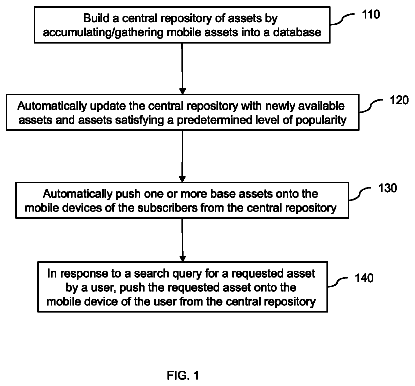
Centralized management of mobile assets--push based management of corporate assets
An embodiment of the invention provides a method for the centralized management of mobile assets.
US 8,533,290 B2 · Assignee: Konica Minolta Business Technologies, Inc. · Inventors: Shozaki; Toshiya et al.
Sheet 1 of 26 from the published document. All sheets in the USPTO PDF
An installation support method that supports an installation of an application, comprising: a searching step of searching installed applications for an application which is of the same type as a new application to be installed; and a setting step of obtaining configuration values of the application found by the search, and setting initial configuration values of the new application to be the obtained configuration values.
Field of the Invention The present invention relates to an installation support method and a workflow generation support method, which can reduce the burden on a user who installs a new application program and generates a new workflow. Description of the Related Art In the technical field of document processing devices having functions of a scanner, a copier, a printer, a FAX and so on (e.g. MFP: Multi Function Peripheral), many kinds of application programs (hereinafter simply called "applications") to process documents have been developed in recent years. Many configuration values are used for configuring such applications, and the user usually customizes the values according to his/her purpose and preference. Such applications are often updated in order to add or improve functions, or to fix bugs. However, if an update (especially a major update) to the application is installed, the c
1 of 26 drawing sheets so far from the published document, cropped to the drawing. Every sheet is in the USPTO PDF.
What the patent claimed, word for word. All of it is now free to use.
This application is based on an application No. 2005-204799 filed on Jul. 13, 2005 in Japan, the contents of which is hereby incorporated by reference.
Field of the Invention
The present invention relates to an installation support method and a workflow generation support method, which can reduce the burden on a user who installs a new application program and generates a new workflow.
Description of the Related Art
In the technical field of document processing devices having functions of a scanner, a copier, a printer, a FAX and so on (e.g. MFP: Multi Function Peripheral), many kinds of application programs (hereinafter simply called "applications") to process documents have been developed in recent years.
Many configuration values are used for configuring such applications, and the user usually customizes the values according to his/her purpose and preference. Such applications are often updated in order to add or improve functions, or to fix bugs.
However, if an update (especially a major update) to the application is installed, the configuration values are usually replaced by the default values of the update.
This means that the configuration values, which the user took a long time to set, are will be reset. To obtain the same configuration, the user has to manually set the configuration values again.
Some users dislike changing the configuration because of the heavy workload of setting the configuration again after finishing the installation. They often use the previous version and avoid installing the update. This hinders the diffusion of the update.
In the case where a new application similar to an application which has been already installed (hereinafter called the "existing application") is installed, it is preferable that the configuration of the existing application is inherited by the new application.
By the way, the inventors of the present invention have been developing a workflow system that performs a plurality of procedures, which are linked together, for processing a document.
To newly generate a workflow used in this system, the user has to define each node constituting the workflow.
Especially, if the workflow is for performing procedures by transferring data among a plurality of devices, the burden on the user increases because the user has to define many items for each node.
The present invention is made to solve the problem above. The first object of the present invention is to provide an installation support method, by which configuration values set for an existing application are inherited by a new application, and thereby reduce the burden on the user who installs the new application.
The second object of the present invention is to provide a workflow generation support method that can use an existing node definition to complement a definition of a new workflow to be generated, and thereby reduce the burden on the user who generates a new workflow.
The first object is fulfilled by an installation support method that supports an installation of an application, comprising: a searching step of searching installed applications for an application which is of the same type as a new application to be installed; and a setting step of obtaining configuration values of the application found by the search, and setting initial configuration values of the new application to be the obtained configuration values.
With the stated structure, the initial configuration values of the new application become the same as the configuration values of the installed application. Accordingly, the user can use the new application with the setting that is similar to the accustomed setting from the beginning. This means that the workload required for reconfiguring the application is reduced.
The installation support method may further comprise a selecting step of, if a plurality of applications are found by the search, selecting one of the applications, wherein the setting step obtains the configuration values of the selected application.
Each installed application may have priority information given by a user, and the selecting step may use the priority information to select the one of the applications.
With the stated structure, the method can select the application having the highest priority, which has been used as a default application before the new application is installed. This enables the user to use the accustomed setting after the new application is installed.
Each installed application may have version information, and the selecting step may preferentially select a latest version from the found applications.
With the stated structure, the method can select the latest version, which has been presumably used by the user on a routine basis. This enables the user to use the accustomed setting after the new application is installed. Also, the configuration items for the latest version are presumably similar to those of the new application. Therefore, many configuration values can be inherited by the new application.
The new application may be installed in a first information processing device, the first information processing device may be connected to a second information processing device via a network, the installed applications may be in the second information processing device, and the searching step may search for the application from the installed applications in the second information processing device.
The application installed in the second information processing device in a LAN of an office or the like is usually shared by colleagues, and the configuration of the application set by the colleagues is often similar to the configuration that the user wishes to use with the new application. With the stated structure, the number of the configuration values that the user has to set decreases. Accordingly, the user can use the new application without stress from the beginning.
The installed applications and the new application may be device drivers, and the searching step may search for the application that supports the same device as the new application supports.
The searching step may search for a device that exists in the network and is supported by the new application, and may search for the application that supports the found device.
The configuration of the application installed in the device in a LAN of an office or the like is often adjusted so as to suit, for instance, the location where the device is, the object of use, and characteristics of the device. Therefore, the configuration of the installed application is often similar to the configuration that the user of the new application wishes to use. With the stated structure, the adjusted configuration of the installed application is inherited by the new application. This is of benefit to the user.
The installed applications and the new application may be device drivers, and the searching step may search for the application that supports a device whose degree of agreement with a device supported by the new application is high
The new application may be a printer driver, the device that the new application supports may be a printer, and the configuration values may relate to a configuration of the printer.
The new application may be utility software relating to a BOX which is a predetermined region allocated in a storing unit of a document processing device, and the configuration values may relate to a configuration of the BOX.
The second object is fulfilled by a workflow generation support method that supports a generation of a workflow including nodes, comprising: a receiving step of receiving, from a user, a definition of a new node which is to be generated; a judging step of judging whether the received definition is complete; a searching step of searching stored nodes which have been previously generated for a node whose definition relates to the new node, if the judging step judges in the negative; and a complementing step of obtaining the definition of the node found by the search, and complementing an incomplete part of the received definition using the obtained definition.
The workflow generation support method may further comprise a selecting step of displaying candidate nodes to the user if a plurality of nodes are found by the search, and receiving an instruction from the user to select one of the candidate nodes.
With the stated structure, the node desired by the user can be generated.
The definition of each node may include a procedure ID relating to the node, and the searching step may search for the node whose procedure ID is the same as the procedure ID of the new node.
The definition of each node may include a procedure ID relating to the node and a device ID used for identifying the device that performs a procedure included in the node, and the judging step may judge that the received definition is incomplete if the device ID is not specified by the user or the device is not capable of performing the procedure.
The user, who wishes to generate a workflow, is interested in what the user can obtain by the specific procedures, such as scanning, faxing, and transmission. However, the user often does not know very much as to which device performs which procedure. With the stated structure, if the device that performs the desired procedure is not specified by the user or the device specified by the user is not appropriate, the definition relating to an appropriate device can be complemented by the method, and the workflow can be generated.
The workflow may be for processing a document while transferring the document among a plurality of devices connected together via a network, the searching step may search for a node whose procedure ID is the same as the procedure ID of the new node, and the complementing step may add, to the definition of the found node, a definition of a transfer node, which is used for transferring the document to the device identified by the device ID.
With the stated structure, the user is not required to add the transmission node by himself, because the transmission node is automatically added by the method to a location where is immediately before the node that includes the predetermined procedure.
The workflow may be generated for processing a document while transferring the document among a plurality of devices connected together via a network, and the judging step may judge that the received definition is incomplete if the definition is not in conformity with a predetermined rule.
The rule can be set by the user. Accordingly, with the stated structure, the user can customize a workflow.
The installation support device according to the present invention is an installation support device that supports an installation of an application, comprising: a searching unit operable to search installed applications for an application which is of the same type as a new application to be installed; and a setting unit operable to obtain configuration values of the application found by the search, and to set initial values of the new application to be the obtained configuration values.
The installation support device may further comprise a selecting unit operable to select one of applications if a plurality of applications are found by the search, wherein the setting unit may obtain the configuration values of the selected application.
The new application may be installed in a first information processing device, the first information processing device may be connected to a second information processing device via a network, the installed applications may be in the second information processing device, and the searching unit may search for the application from the installed applications in the second information processing device.
The installed applications and the new application may be device drivers, and the searching unit may search for the application that supports the same device as the new application supports.
These and the other objects, advantages and features of the invention will become apparent from the following description thereof taken in conjunction with the accompanying drawings which illustrate a specific embodiment of the invention. In the drawings:
FIG. 1 shows a structure of a workflow system 1;
FIG. 2 is a functional block diagram of a PC 100;
FIG. 3 shows details of a configuration file 114;
FIG. 4 shows details of an application function table 122;
FIG. 5 is a flowchart showing a procedure performed for setting configuration values;
FIG. 6 is a flowchart showing a search and selection procedure A;
FIG. 7 is a flowchart showing an intra-LAN search and selection procedure performed within a LAN;
FIG. 8 is a flowchart showing an obtaining and setting procedure for obtaining configuration values from an application selected in a search and selection procedure A, and setting the obtained configuration values to a new application;
FIG. 9 is a conceptual diagram showing an example procedure for obtaining configuration values from an existing application and setting the obtained configuration values to a new application;
FIG. 10 is a functional block diagram hierarchically showing a structure of an MFP 200 according to the second embodiment;
FIG. 11 is a functional block diagram focusing on a storage function of an MFP 200;
FIG. 12 is a table showing a list of configuration files;
FIG. 13 shows details of an application function table 282;
FIG. 14 is a flowchart showing a procedure for setting configuration values according to the second embodiment;
FIG. 15 is a flowchart showing a search and selection procedure B;
FIG. 16 is a functional block diagram of a workflow server 400;
FIG. 17 shows details of a node classification table 422;
FIG. 18 is a flowchart showing a procedure performed by a workflow server 400 for generating a workflow definition;
FIG. 19 shows a user S standing in front of the MFP 300, and the user's wish;
FIG. 20 shows an operation panel unit of an MFP 300, which displays a screen used for generating a workflow;
FIG. 21 shows details of a workflow generated by a user S using an operation panel of a MFP 300;
FIG. 22 shows a screen used for selecting a procedure from complement candidates displayed on an operation panel unit;
FIG. 23 shows a confirmation screen displaying a completed workflow to a user;
FIG. 24 shows a completed workflow;
FIG. 25 shows a workflow including a flow of data (a document file) scanned by an MFP B; and
FIG. 26 shows a screen showing that a registration of a workflow failed.
The following describes embodiments of the present invention with reference to the drawings.
FIG. 1 shows a structure of a workflow system 1. In the following embodiments, the description is based on this system structure.
The workflow system 1 includes a PC 100 (PC A) as a information processing device, an MFP 200 (MFP A) and an MFP 300 (MFPB) as document processing devices, and a workflow server 400. The devices are connected together via a LAN (Local Area Network) cable 2.
An IP (Internet Protocol) address is assigned to each device, and a name resolution is performed by a DNS (Domain Name System) server, which is not illustrated. In FIG. 1, the names given to the devices are shown under their respective IP addresses.
The first embodiment describes the installation support method for the case where a new application is installed in the PC 100, and the second embodiment describes the installation support method for the case where a new application is installed in the MFP 200. The third embodiment describes a workflow generation support method.
The First Embodiment
<Installation in PC>
The PC 100 and one or more information processing devices (not illustrated in FIG. 1) exist in the LAN.
FIG. 2 is a functional block diagram of the PC 100.
The PC 100 includes an application storing unit 110, a table storing unit 120, an existing application searching unit 130, a network searching unit 140, an obtaining and setting unit 150 and a control unit 160.
The application storing unit 110 stores a group of existing applications 112 that has been installed in the PC 100, and a configuration file 114 containing configuration values set to items used for configuring each application included in the group of applications 112.
The table storing unit 120 stores an application function table 122. The application function table 122 is an index of the group of applications 112 stored in the application storing unit 110.
The existing application searching unit 130 searches the application function table 122 for existing applications of the same type as a newly installed application.
The network searching unit 140 searches the other devices existing within the LAN for the existing applications installed (stored) in the devices.
The obtaining and setting unit 150 obtains configuration values included in the configuration file of an existing application, which is selected from the existing applications found by the existing application searching unit 130 or the network searching unit 140, and set the obtained values as the configuration values for the new application.
The control unit 160 is structured by hardware, such as a CPU, a RAM and a ROM, and controls each unit included in the system.
FIG. 3 shows the details of the configuration file 114. In FIG. 3, the configuration file is assumed to be in a text format for the sake of simplification. However, it may be in a binary format.
The configuration file has four parts, namely "Application Name", "Category", "Configuration Item", and "Configuration Value".
The application "BOX Utility" is utility software installed in the PC 100, and is used for, for instance, newly generating a BOX of MFP and registering a user. The BOX is a specific region on a hard disk or the like, and is allocated to each user.
The category "BOX Configuration" includes items "Type", "Capacity", "Name", "Period of Validity", "Password" and "Display". The category "User Registration" includes items "Print Permission" and "Function Restriction".
The item "Type" is used for defining the attribute of the BOX, and two configuration values, namely "User" (Only for a specific user) and "Public" (Open to public), are available for defining the attribute.
The item "Capacity" is used for setting a storage capacity that is to be allocated to the BOX. The item "Period of Validity" is used for setting a period in which a document is stored in the BOX. The item "Password" is used for setting a password by which the user can access the document stored in the BOX.
The item "Display" is used for setting the method for displaying the BOX, and two configuration values, namely "All" (Showing the BOX to all the users) and "Only for User" (Showing the BOX to only a specific user, and hiding the BOX from the other users), are available for defining the method.
As configuration values used for the item "Print Permission", two values, namely "BW", which permits only a black and white printing, and "Full Color/BW", which permits a full color printing as well, are available.
The application "BizhubC350 Printer Driver" is a printer driver supporting the model "BizhubC350". In the same way, the application "BizhubC450 Printer Driver" supports the model "BizhubC450".
Each configuration item for the printer drivers relates to the way of printing. The item "Color/Black and White" is used for selecting a color printing or a black and white printing. The item "Both Sides" is used for selecting a both sides printing or a one side printing. The item "Layout" is used for laying out a plurality of pages on one sheet. The items "Number of Prints", "Paper Feed Tray" and "Watermark" are further included in the configuration items.
FIG. 4 shows details of an application function table 122.
The application function table 122 has been previously generated by extracting predetermined pieces of information from the application 12, and is stored in the application storing unit 10. Every time a new application is installed in the application storing unit 10, pieces of information relating to the installed application will be registered in the application function table 122.
The application function table 122 includes six parts, namely "Application Type", "Application Name", "Configuration File Path", "Developer", "Model" and "Default".
The part "application Type" is used for categorizing the type of the application, and includes "BOX management", "User Management" (managing users of the MFP), "Printer Driver" and "Document Management" (managing documents stored in the BOX within the MFP).
In this embodiment, applications used for managing peripheral devices of the PC 100 (utility software) and an application for controlling operations of the peripheral devices (a device driver) are described. The former is categorized in "Box Management", "User Management" and "Document Management", and the latter is categorized in "Printer Driver".
The part "Application Name" represents the name of the application.
The part "Configuration File Path" represents a file path showing the location of the configuration file. For instance, the configuration file path of the "BizhubC350" is "C: ProgramFiles Driver konicaminolta BizhubC350 settei.ini".
The part "Developer" represents the developer of the application.
The part "model" represents the model that is supported by the application.
The part "default" represents a priority of the application. The sign "*" (an asterisk) represents that the application has been used as a default application (which is given high priority) among the applications of the same type.
Next, the following describes procedures for setting the configuration values, which are performed by the control unit 160 when a new application is installed in the PC 100.
FIG. 5 is a flowchart showing the procedures for setting the configuration values.
If a predetermined application is newly installed (S11), the control unit 160 identifies the type of the newly installed application (hereinafter simply called "the new application") (S12). This identification is performed based on a specific description pattern included in the program of the new application or the application ID code described in the configuration file of the application.
Next, the control unit 160 registers the new application in the application function table 122 (S13). This registration is performed for enriching the application function table 122.
Then, the control unit 160 searches for candidate applications, from which the configuration values may be obtained, from the existing applications, and the processing goes to a search and selection procedure A (S14).
FIG. 6 is a flowchart showing the details of the search and selection procedure A.
In the search and selection procedure A, the control unit 160 searches the application function table 122 for existing applications of the same type as the new application (S20). Needless to say, the new application is excluded from the scope of the search.
If only one candidate application is found by the search (S21: YES, S22: NO), the control unit 160 selects the found application so that the configuration values are obtained from the application (S23).
If a plurality of candidate applications are found by the search (S21: YES, S22: YES), the processing goes to Step S24.
In Step S24, the control unit 160 judges whether the default application is included in the existing applications, and if included (S24: YES), the control unit 160 selects the default application as the application from which the configuration values should be obtained (S25).
The reason why the default application is selected as the application from which the configuration values should be obtained is that it is highly possible that the default application has been regularly used by the user and accordingly the configuration values for the application are customized by the user. Therefore, it is beneficial to the user that the customized values are inherited by the new application.
If no default application is included in the existing applications (S24: NO), the processing jumps to Step S26.
In step S26, the control unit 160 compares the versions of the found applications with each other, and if the latest version is included in the found applications (S27: YES), the control unit 160 selects the latest version as the application from which the configuration values should be obtained (S28).
The reason why the latest version is selected as the application from which the configuration values should be obtained is that it is highly possible that the latest version has been regularly used by the user, and the configuration items are similar to those of the new application. Accordingly, it is also highly possible that many configuration values can be inherited by the new application.
In Steps S26 and S27, the versions of the existing applications are compared with each other. However, the version of the new application may be compared with the version of each existing application, and the existing application whose version is closest to the version of the new application may be selected.
If the latest version is not included in the found applications (S27: NO), in other words, if all the found applications have the same version or the version numbers are not discriminable for instance, the processing jumps to an intra-LAN search and selection procedure (S29) which is performed for searching the existing applications installed in the devices existing within the LAN.
FIG. 7 is a flowchart showing the intra-LAN search and selection procedure.
In the intra-LAN search and selection procedure, the control unit 160 searches for existing devices within the LAN (S31).
To perform the search, the control unit 160 firstly transmits predetermined packet data to all the devices existing within the LAN (including the information devices, peripheral devices such as document processing devices, and so on), and confirms the existence of each device based on a response received from the device.
Next, the control unit 160 identifies the models of the existing devices (S311). To perform this identification, a table in which MAC (Media Access Control) addresses of the devices and the models of the devices are associated with each other has been prepared.
Next, the control unit 160 compares the model supported by the new application with the models found by the search which has been performed within the LAN (S32), and judges whether the model supported by the new application is included in the devices existing within the LAN (S33).
If the model supported by the new application is found in the devices existing within the LAN (S33: YES), the control unit 160 searches for an application that supports the found model from the applications installed in the model found in Step S33 (S34).
If only one application is found by the search performed in Step S34 (S35: YES, S36: NO), the control unit 160 selects the found application as the application from which the configuration values should be obtained (S38), and the processing returns to the main routine.
The following describes this procedure more specifically, by assuming that the new application is a printer driver. A model "BizhubC450" is identified in Step S311. If the new printer driver supports the model "BizhubC450" (S32, S33: YES), the control unit 160 searches, from the devices existing within the LAN, existing printer drivers that support the model "BizhubC450" in Step S34. Here, in step S34, the control unit 160 searches only the printer drivers of shared printers exist within the LAN. The usability of the printer sharing function of the printer is generally settable for each printer driver.
A printer existing within a LAN of an office or the like is usually shared by a plurality of users, and the configuration of the printer driver for the printer is often similar to the configuration that the user wishes to use with the new printer (the existing printer driver is possibly used by a colleague of the user). Therefore, if the existing printer driver can be selected, it is beneficial to the user of the new printer driver.
Again, In FIG. 7, if a plurality of applications are found by the search (S35: YES, S36: YES), the control unit 160 displays a list of the found applications from which the configuration values can be obtained on the PC 100, and has the user select an application from the list (S37). Here, instead of performing the Step S37, the application may be automatically selected by comparing the versions of the found applications.
FIG. 8 is a flowchart showing the obtaining and setting procedure for obtaining the configuration values from the application selected in the search and selection procedure A, and setting the obtained configuration values to the new application.
If an application is selected by the user (S41: YES), the control unit 160 reads out the configuration values of the selected application (S42). Here, the control unit 160 reads out the configuration items included in the configuration file and the configuration values corresponding to each configuration item.
Next, the control unit 160 sets the read-out configuration values to the new application (S43). More specifically, the control unit 160 rewrites the configuration file of the new application, which is generated when the new application is installed.
If no application is selected (S41: NO), the processing goes to Steps S44 to S46, in which the user manually sets the configuration values. These Steps are prepared for the convenience of the user who has just begun to use the new application. Accordingly, the Steps may be skipped.
Example Procedure for Obtaining and Setting Configuration Values
Next, the procedure for obtaining and setting configuration values is described briefly by taking the BOX utility as an example of the existing application.
FIG. 9 is a conceptual diagram showing an example procedure for obtaining configuration values from the existing application and setting the obtained configuration values to the new application.
As FIG. 9C shows, if a new version of the BOX utility "ver3" is installed in the PC 100, in which the BOX utilities "ver2" and "ver1" have been already installed as existing applications as FIG. 9A and FIG. 9B show, the default application "BOX utility ver2" shown in FIG. 9A is to be selected as the application from which the configuration values should be obtained.
Then, the configuration values of the "BOX utility ver2" will be set to "the BOX utility ver3", which is the new application shown in FIG. 9C, as the initial values.
Accordingly, the user can use the familiar configuration values with the new application from the beginning, because the configuration values of the default application "BOX utility ver2", which have been customized by the user, are inherited by the new application "BOX utility ver3" as the initial configuration values. Therefore, the change of the use environment is not to be caused by the installment of the new application.
The Second Embodiment
<Installation in MFP>
The second embodiment describes the case where the new application is installed in the MFP 200, which is a document processing device (also having a function of an information processing device).
The structure of the second embodiment for obtaining configuration values from the existing application and setting the obtained values to the new application is similar to the structure of the first embodiment. Therefore, the difference is mainly described here.
FIG. 10 is a functional block diagram hierarchically showing the structure of the MFP 200 according to the second embodiment.
The MFP 200 includes a first layer 201 which is at the top level and relates to applications, a second layer 202 which provides an API (Application Program Interface), and a third layer 203 structure by hardware.
The first layer 201 includes a panel APP (Application) 210, a printer APP 212, an install support APP 214, a FAX APP 224 and a BOX APP 226.
The panel APP 210 is an application for managing functions of the operation panel unit 246.
In the same manner, the printer APP 212 is an application relating to functions of the printer unit 240, the FAX APP 224 is an application relating to FAX functions, and the BOX APP 226 is an application relating to functions of the BOX.
The install support APP 214 includes an obtaining and setting unit 216, an existing application searching unit 218, an operation verifying unit 220, and an installing unit 222.
The obtaining and setting unit 216 obtains configuration values from the selected application, and applies the obtained values to the new application.
The existing application searching unit 218 searches the existing applications for an application of the same type as the new application.
The operation verifying unit 220 verifies that the new application operates properly after the configuration values for the found existing application are applied to the new application.
The installing unit 222 performs the installation of the new application.
The second layer 202 includes an I/O control unit 230, an engine control unit 232 and an OS 234.
The I/O (Input/Output) control unit 230 controls an input and an output of the data between functional blocks.
The engine control unit 232 controls the operation performed by each functional block.
The OS 234 performs basic functions, such as providing API to applications, the hardware management, the memory management, and so on.
The third layer 203 includes a printer unit 240, a scanner unit 242, an I/O unit 244 and an operation panel unit 246.
The printer unit 240 prints characters and images on a sheet.
The scanner unit 242 scans images on the document, and digitizes the images.
The I/O unit 244 is an input/output port of the MFP 200, and more specifically, it includes a USB (Universal Serial Bus), an IEEE1394, and so on.
The operation panel unit 246 includes a display panel and a buttons used for receiving instruction from the user, and a touch-sensitive panel.
FIG. 11 is a functional block diagram focusing on a storage function of the MFP 200.
The MFP 200 includes functional blocks relating to the storage function, namely a BOX (Public) 250, a BOX (User A) 260, a BOX (User B) 270 and a management BOX 280.
Each of the BOX 250, the BOX 260, the BOX 270 and the BOX 280 is a directory to which a region on a HDD (Hard Disk Drive) having a predetermined size is allocated.
The BOX 250 is a shared BOX which is open to all users of the MFP 200, and stores an image processing application B252, an image processing application C254 and a format converting application B256. Each application has a configuration file associated with the application.
Each of the BOX 260 and BOX 270 is a box only for a specific user (a private BOX), and requires an authentication using a password or the like to access data inside the BOX.
The management BOX 280 is a BOX for storing data used for managing BOX functions and so on, and stores an application function table 282.
FIG. 12 is a table showing a list of configuration files of the applications, and corresponds to FIG. 3 of the first embodiment.
The "image processing application" is used for processing the image data scanned by the scanner unit 242, and has configurations items, namely "background removal", "contrast", "color", "smoothing", "deskew" and "inversion".
Each of the items "background removal", "contrast" and "smoothing" has values "strong" and "week".
The item "color" has values "color saturation priority" and "color phase priority".
Each of the items "deskew" and "inversion" has values "on" and "off".
The format converting application is used for change the format of an image, and has configuration items, namely "page layout", "centering", "page number", and "format".
A notifying application is included in each of the MFPB, the MFPC and the printer, and is used for notifying external devices of the progress of the procedure performed by each device. The notifying application has configuration items "protocol", "conditions", and "destination".
The item "protocol" represents the protocol used for the notification, and has values "Mail" and "SNMP (Simple Network Management Protocol) Trap".
If the value "Mail" is set, the notification is performed by transmitting a mail using a mailer which the MFP 200 includes.
FIG. 13 shows details of the application function table 282, and corresponds to FIG. 4 of the first embodiment.
The application function table 282 is stored in MFP 200. Every time a new application is installed in the MFP 200, a new entry is added into the application function table. The added entry is notified to the MFP 300 at the same time, and then, the application function table of the MFP 300 is updated as well. Accordingly, the same application table is stored in the MFP 200 and the MFP 300.
The application function table 282 includes items "application type", "application name", "configuration file path" and "model attribute".
The item "configuration file path" represents where the configuration file is. For instance, "MFP A: UserA . . . " represents that the MFP 200 exists in the BOX 260 of the MFP 200.
The item "model attribute" represents the model attribute.
FIG. 14 is a flowchart showing a procedure for setting the configuration values according to the second embodiment.
When the installation finishes (S101: YES), the control unit 160 identifies the type of the installed new application, and register the new application in the application function table 282 (S102).
Then, Step S103 of the search and selection procedure B is performed for searching the existing applications and selecting an application from which the configuration values should be obtained. The obtaining and setting procedure (S15) performed after the search and selection procedure B is the same as the procedure described with reference to FIG. 8, and therefore it is not described here.
FIG. 15 is a flowchart showing a search and selection procedure B.
In the search and selection procedure B, the control unit 160 searches the application function table 282 for the existing application whose type is the same as the new application based on the identified model attribute (S111).
If no such an application is found by the search, the control unit 160 searches for the existing applications in the other devices (S112: NO, S113).
If the existing application is found by the search (S112: YES, or S114: YES), the control unit 160 judges whether or not the location of the found application is in the same BOX as the new application or the Public BOX (S115), and if the control unit 160 judges in the negative (S115: NO), the application from which the configuration values should be obtained is not to be selected, and the processing goes to Steps S44 to 46 (see FIG. 8) in which the configuration values are manually set by the user.
Here, "the same BOX as the new application" means the BOX where the new application is installed.
In Step S115, the reason why the judgement is performed is because if the configuration values of an application in a private BOX of other user are allowed to be inherited, it enables the new user to see the configuration of the other user. This is a problem in the viewpoint of security.
If a plurality of the existing applications are found by the search (S116: YES), the control unit 160 compares the model attributes of the existing applications and the model attribute of the new application (S117). If the model attribute of any of the existing applications is the same as the model attribute of the new application (S118: YES), the control unit set the application as the application from which the configuration values should be obtained (S119).
As described above, with the structure described in the second embodiment, the configuration of the existing application can be inherited even in the case where the new application is installed in the MFP 200.
The description continues in the full USPTO document.
About 6,539 words. The USPTO PDF has it with every drawing.
Fees are due 3.5, 7.5 and 11.5 years after grant. This patent expired on September 10, 2025, so the fee marked "not paid" was the one that went unpaid.
Installation support method and workflow generation support method
Filed Oct 2005 · published Jan 2007Installation support method and workflow generation support method
Filed Oct 2005 · granted Sep 2013Earlier publications, parents and continuations. None of them can still be enforced, or this patent would not be listed.
Prior art cited by the examiner or applicant. Useful when you check your own idea for novelty.
Everything on this page comes from the documents linked above.


